
User Manual
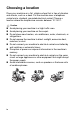
Table Of Contents
- USER’S GUIDE FAX-1840C/MFC-3240C
- APPROVAL INFORMATION
- Compilation and Publication Notice
- Safety precautions
- Choosing a location
- Quick Reference Guide
- Table of Contents
- 1 Introduction
- 2 Getting started
- 3 Setup Send
- How to enter Fax mode
- How to dial
- How to Fax (B&W and Colour)
- Basic sending operations
- Advanced sending operations
- Broadcasting (Not available for colour faxes)
- Overseas Mode
- Delayed Fax (Not available for colour faxes)
- Delayed Batch Transmission (Not available for colour faxes)
- Setup for Polled Transmit (Standard) (Not available for colour faxes)
- Setup for Polled Transmit with Secure Code (Not available for colour faxes)
- TX Lock (Key Lock for some countries)
- 4 Setup Receive
- Basic receiving operations
- Choosing the Receive Mode
- Setting the Ring Delay
- Setting the F/T Ring Time (Fax/Tel mode only)
- Fax Detect (MFC-3240C only)
- Fax Detect (FAX-1840C only)
- Printing a reduced incoming fax (Auto Reduction)
- Receiving a fax at the end of a conversation
- Printing a fax from the memory
- Reception into memory (Not available for colour fax reception)
- Polling
- Basic receiving operations
- 5 Quick-Dial numbers and dialling options
- 6 Remote Fax Options (Not available for colour faxes)
- 7 Printing reports
- 8 Making copies
- 9 Important information
- 10 Troubleshooting and routine maintenance
- Appendix A
- Telephone Service for Australia
- Telephone Service for New Zealand
- Telephone Service for Some Countries
- Advanced receiving operations
- Connecting an external device to your machine
- Appendix B
- Glossary
- Specifications
- Index
- Remote Retrieval Access card
- brother ARL/ASA/NZ

iv
Choosing a location
Place your machine on a flat, stable surface that is free of vibration
and shocks, such as a desk. Put the machine near a telephone
socket and a standard, grounded electrical socket. Choose a
location where the temperature remains between 10°-35°C.
Caution
■
Avoid placing your machine in a high-traffic area.
■
Avoid placing your machine on the carpet.
■
Do not place near heaters, air conditioners, water, chemicals, or
refrigerators.
■
Do not expose the machine to direct sunlight, excessive heat,
moisture, or dust.
■
Do not connect your machine to electrical sockets controlled by
wall switches or automatic timers.
■
Disruption of power can wipe out information in the machine’s
memory.
■
Do not connect your machine to electrical sockets on the same
circuit as large appliances or other equipment that might disrupt
the power supply.
■
Avoid interference sources, such as speakers or the base units
of cordless phones.