
User Manual

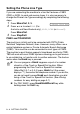
Table Of Contents
- USER’S GUIDE FAX-1840C/MFC-3240C
- APPROVAL INFORMATION
- Compilation and Publication Notice
- Safety precautions
- Choosing a location
- Quick Reference Guide
- Table of Contents
- 1 Introduction
- 2 Getting started
- 3 Setup Send
- How to enter Fax mode
- How to dial
- How to Fax (B&W and Colour)
- Basic sending operations
- Advanced sending operations
- Broadcasting (Not available for colour faxes)
- Overseas Mode
- Delayed Fax (Not available for colour faxes)
- Delayed Batch Transmission (Not available for colour faxes)
- Setup for Polled Transmit (Standard) (Not available for colour faxes)
- Setup for Polled Transmit with Secure Code (Not available for colour faxes)
- TX Lock (Key Lock for some countries)
- 4 Setup Receive
- Basic receiving operations
- Choosing the Receive Mode
- Setting the Ring Delay
- Setting the F/T Ring Time (Fax/Tel mode only)
- Fax Detect (MFC-3240C only)
- Fax Detect (FAX-1840C only)
- Printing a reduced incoming fax (Auto Reduction)
- Receiving a fax at the end of a conversation
- Printing a fax from the memory
- Reception into memory (Not available for colour fax reception)
- Polling
- Basic receiving operations
- 5 Quick-Dial numbers and dialling options
- 6 Remote Fax Options (Not available for colour faxes)
- 7 Printing reports
- 8 Making copies
- 9 Important information
- 10 Troubleshooting and routine maintenance
- Appendix A
- Telephone Service for Australia
- Telephone Service for New Zealand
- Telephone Service for Some Countries
- Advanced receiving operations
- Connecting an external device to your machine
- Appendix B
- Glossary
- Specifications
- Index
- Remote Retrieval Access card
- brother ARL/ASA/NZ

2 - 3 GETTING STARTED
Setting the Phone Line Type
If you are connecting the machine to a line that features a PABX
(PBX) or ADSL to send and receive faxes, it is also necessary to
change the Phone Line Type accordingly by completing the following
steps.
1
Press
Menu/Set
,
0
,
5
.
2
Press
▲
or
▼
to select
PBX
(For
Australia and New Zealand only),
ADSL
,
ISDN
(or
Normal
).
Press
Menu/Set
.
3
Press
Stop/Exit
.
PABX and TRANSFER
The machine is initially set to be connected with PSTN (Public
Switched Telephone Network) lines. However, many offices use a
central telephone system or Private Automatic Branch Exchange
(PABX). Your machine can be connected to most types of PABX.
The machine’s recall feature supports timed break recall only (TBR).
TBR will work with most PABX systems allowing you to gain access
to an outside line, or transfer calls to another extension. The feature
works when the
Hook
key is pressed.
■
You can program a
Hook
keypress as part of a number
stored in a One-Touch or Speed-Dial location. When
programming the One-Touch or Speed-Dial number
(Menu/Set 2-3-1 or 2-3-2) press
Hook
first (the screen
displays "!"), then enter the telephone number. If you do this,
you do not need to press
Hook
each time before you dial
using a One-Touch or Speed-Dial location. (See Storing
numbers for easy dialling
on page 5-1.)
■
For FAX-1840C, press
Hook/Hold/Recall
key while
holding down the Shift key.
5.Phone Line Set