
User Manual
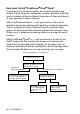

Table Of Contents
- USER’S GUIDE FAX-1840C/MFC-3240C
- APPROVAL INFORMATION
- Compilation and Publication Notice
- Safety precautions
- Choosing a location
- Quick Reference Guide
- Table of Contents
- 1 Introduction
- 2 Getting started
- 3 Setup Send
- How to enter Fax mode
- How to dial
- How to Fax (B&W and Colour)
- Basic sending operations
- Advanced sending operations
- Broadcasting (Not available for colour faxes)
- Overseas Mode
- Delayed Fax (Not available for colour faxes)
- Delayed Batch Transmission (Not available for colour faxes)
- Setup for Polled Transmit (Standard) (Not available for colour faxes)
- Setup for Polled Transmit with Secure Code (Not available for colour faxes)
- TX Lock (Key Lock for some countries)
- 4 Setup Receive
- Basic receiving operations
- Choosing the Receive Mode
- Setting the Ring Delay
- Setting the F/T Ring Time (Fax/Tel mode only)
- Fax Detect (MFC-3240C only)
- Fax Detect (FAX-1840C only)
- Printing a reduced incoming fax (Auto Reduction)
- Receiving a fax at the end of a conversation
- Printing a fax from the memory
- Reception into memory (Not available for colour fax reception)
- Polling
- Basic receiving operations
- 5 Quick-Dial numbers and dialling options
- 6 Remote Fax Options (Not available for colour faxes)
- 7 Printing reports
- 8 Making copies
- 9 Important information
- 10 Troubleshooting and routine maintenance
- Appendix A
- Telephone Service for Australia
- Telephone Service for New Zealand
- Telephone Service for Some Countries
- Advanced receiving operations
- Connecting an external device to your machine
- Appendix B
- Glossary
- Specifications
- Index
- Remote Retrieval Access card
- brother ARL/ASA/NZ

A - 6 APPENDIX A
Telephone Service for New Zealand
FaxAbility
FaxAbility is a service offered by Telecom that allows you to have an
additional number on one phone line, with its own distinctive ring
pattern. This way, when you get an incoming call, you can identify the
number being called by its ring.
How Will the Fax Machine Treat All Other Numbers?
FaxAbility mode ensures that the machine will answer calls to the
FaxAbility (secondary) number. When a call comes in to your main
number, all the phones will ring. You can set an external answering
device (TAD) to answer calls on the other number(s). (See the chart
in the following page.)
What is the Advantage of Using the FaxAbility Function?
Using FaxAbility is the most efficient way to receive both fax and
telephone calls on the same line. It is much easier for your callers
who dial manually. The fax machine will answer with receiving tones
so they will not have to press an activation code. And the people who
call to talk on your main number will not have to talk to your fax
machine. Basically, it gives you two independent numbers without
the higher cost of a second line.