
User Manual


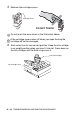
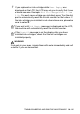
Table Of Contents
- USER’S GUIDE FAX-1840C/MFC-3240C
- APPROVAL INFORMATION
- Compilation and Publication Notice
- Safety precautions
- Choosing a location
- Quick Reference Guide
- Table of Contents
- 1 Introduction
- 2 Getting started
- 3 Setup Send
- How to enter Fax mode
- How to dial
- How to Fax (B&W and Colour)
- Basic sending operations
- Advanced sending operations
- Broadcasting (Not available for colour faxes)
- Overseas Mode
- Delayed Fax (Not available for colour faxes)
- Delayed Batch Transmission (Not available for colour faxes)
- Setup for Polled Transmit (Standard) (Not available for colour faxes)
- Setup for Polled Transmit with Secure Code (Not available for colour faxes)
- TX Lock (Key Lock for some countries)
- 4 Setup Receive
- Basic receiving operations
- Choosing the Receive Mode
- Setting the Ring Delay
- Setting the F/T Ring Time (Fax/Tel mode only)
- Fax Detect (MFC-3240C only)
- Fax Detect (FAX-1840C only)
- Printing a reduced incoming fax (Auto Reduction)
- Receiving a fax at the end of a conversation
- Printing a fax from the memory
- Reception into memory (Not available for colour fax reception)
- Polling
- Basic receiving operations
- 5 Quick-Dial numbers and dialling options
- 6 Remote Fax Options (Not available for colour faxes)
- 7 Printing reports
- 8 Making copies
- 9 Important information
- 10 Troubleshooting and routine maintenance
- Appendix A
- Telephone Service for Australia
- Telephone Service for New Zealand
- Telephone Service for Some Countries
- Advanced receiving operations
- Connecting an external device to your machine
- Appendix B
- Glossary
- Specifications
- Index
- Remote Retrieval Access card
- brother ARL/ASA/NZ

10 - 26 TROUBLESHOOTING AND ROUTINE MAINTENANCE
Caution
■
Do not remove ink cartridges if you do not need to replace them.
If you do so, it may reduce the ink quantity and the machine will
not know the quantity of ink left in the cartridge.
■
Do not touch the cartridge insertion slots. If you do so, the ink
may stain your skin.
■
If ink stains your skin or clothing, wash with soap or detergent
immediately.
■
If you install an ink cartridge in the wrong colour position, you
must clean the print head several times before you start printing
(after correcting the cartridge installation) because the colours
were mixed.
■
Once you open an ink cartridge, install it in the machine and use
it up within six months of installation. Use unopened ink
cartridges by the expiration date written on the cartridge
package.
■
Do not dismantle or tamper with the ink cartridge, this can cause
the ink to leak out of the cartridge.
■
Brother multifunction machines are designed to work with ink of
a particular specification and work to a level of optimum
performance when used with genuine Brother ink cartridges.
Brother cannot guarantee this optimum performance if ink or ink
cartridges of other specifications are used. Brother does not
therefore recommend the use of cartridges other than genuine
Brother cartridges with this machine or the refilling of empty
cartridges with ink from other sources. If damage is caused to the
print head or other parts of this machine as a result of the use of
ink or ink cartridges other than genuine Brother products due to
the incompatibility or lack of suitability of those products with this
machine, any repairs required as a result will not be covered by
the warranty.