
User Manual

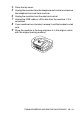
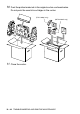

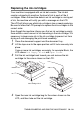
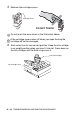
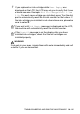
Table Of Contents
- USER’S GUIDE FAX-1840C/MFC-3240C
- APPROVAL INFORMATION
- Compilation and Publication Notice
- Safety precautions
- Choosing a location
- Quick Reference Guide
- Table of Contents
- 1 Introduction
- 2 Getting started
- 3 Setup Send
- How to enter Fax mode
- How to dial
- How to Fax (B&W and Colour)
- Basic sending operations
- Advanced sending operations
- Broadcasting (Not available for colour faxes)
- Overseas Mode
- Delayed Fax (Not available for colour faxes)
- Delayed Batch Transmission (Not available for colour faxes)
- Setup for Polled Transmit (Standard) (Not available for colour faxes)
- Setup for Polled Transmit with Secure Code (Not available for colour faxes)
- TX Lock (Key Lock for some countries)
- 4 Setup Receive
- Basic receiving operations
- Choosing the Receive Mode
- Setting the Ring Delay
- Setting the F/T Ring Time (Fax/Tel mode only)
- Fax Detect (MFC-3240C only)
- Fax Detect (FAX-1840C only)
- Printing a reduced incoming fax (Auto Reduction)
- Receiving a fax at the end of a conversation
- Printing a fax from the memory
- Reception into memory (Not available for colour fax reception)
- Polling
- Basic receiving operations
- 5 Quick-Dial numbers and dialling options
- 6 Remote Fax Options (Not available for colour faxes)
- 7 Printing reports
- 8 Making copies
- 9 Important information
- 10 Troubleshooting and routine maintenance
- Appendix A
- Telephone Service for Australia
- Telephone Service for New Zealand
- Telephone Service for Some Countries
- Advanced receiving operations
- Connecting an external device to your machine
- Appendix B
- Glossary
- Specifications
- Index
- Remote Retrieval Access card
- brother ARL/ASA/NZ

10 - 18 TROUBLESHOOTING AND ROUTINE MAINTENANCE
Packing and shipping the machine
Whenever you transport the machine, use the packing materials that
came with your machine. If you do not pack the machine properly,
you could void your warranty.
Caution
It is important to allow the machine to ‘park’ the print head after a
print job. Listen carefully to the machine before disconnecting it from
the power source to ensure that all mechanical noise has stopped.
Not allowing the machine to complete this parking process may lead
to print problems and possible damage to the print head.
1
Close the document support and the document tray.
2
Lift the top cover to the open position until it locks securely into
place.
3
Remove all the ink cartridges and attach the protective parts.
(See Replacing the ink cartridges on page 10-23.)
Caution
If you are not able to find the protective parts, do NOT remove the ink
cartridges before shipping. It is essential that the machine be
shipped with either the protective parts or the ink cartridges in
position. Shipping without them will cause damage to your machine
and may void your warranty.
When attaching the protective parts, make sure it
clips into place as shown in the diagram.