
Operation Manual



ON-SCREEN PROGRAMMING 3 - 7
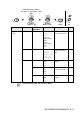
2.Fax
(Continued)
5.Remote Fax
Opt
(Continued)
2.Fax
Storage
On
Off
Stores incoming
faxes in the memory
so you can retrieve
them while you are
away from your
machine.
8-2
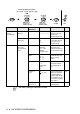
3.Remote
Access
— You must set your
own code for Remote
Retrieval.
8-3
4.Print
Document
— Prints incoming faxes
stored in the
memory.
5-8
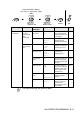
6.Remaining
Jobs
— — Checks which jobs
are in the memory or
cancels a delayed
fax or polling job.
6-10
0.
Miscellaneous
1
.
TX Lock
— Prohibits most
functions except
receiving faxes.
6-18
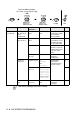
2.BT Call
Sign
(U.K. Only)
On
Off
Use with BT Callsign. 5-15
3.Copy 1.Quality Best
Normal
Fast
Selects the Copy
resolution for your
type of document.
10-16
2.Brightness —- +
- +
- +
- +
- +
Adjusts the
brightness.
10-16
3.Contrast —- +
- +
- +
- +
- +
Adjusts the contrast
for copies.
10-16
Main Menu Submenu Menu
Selections
Options Descriptions Page
The factory settings are shown in Bold.
to
accept
to
exit
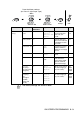
Press the Menu numbers.
(ex. Press 1, 2 for Paper Type)
—
OR
—
Select & Set Select & Set