
Operation Manual



3 - 6 ON-SCREEN PROGRAMMING
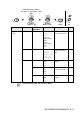
2.Fax
(Continued)
2.Setup Send
(In Fax mode
only)
(Continued)
7.Overseas
Mode
On
Off
Adjusts for overseas
transmissions, which
can sometimes
cause problems.
6-13
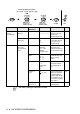
3.Set
Quick-Dial
1.One-Touch
Dial
Stores One-Touch
Dial numbers, so you
can dial by pressing
one key (and Start).
7-1
2.Speed-Dial — Stores Speed-Dial
numbers, so you can
dial by pressing only
a few keys (and
Start).
7-2
3.Setup
Groups
— Sets up a Group
number for
Broadcasting.
7-4
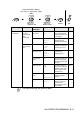
4.Report
Setting
1
.
XMIT Report
On
On+Image
Off
Off+Image
Initial setup for
Transmission
Verification Report
and Fax Journal.
9-1
2.Journal
Period
Every 7 Days
Every 2 Days
Every 24 Hours
Every 12 Hours
Every 6 Hours
Every 50 Faxes
Journal:Off
9-2
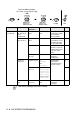
5.Remote Fax
Opt
1.Fax
Forward
On
Off
Sets the machine to
forward fax
messages.
8-1
Main Menu Submenu Menu
Selections
Options Descriptions Page
The factory settings are shown in Bold.
to
accept
to
exit
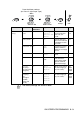
Press the Menu numbers.
(ex. Press 1, 2 for Paper Type)
—
OR
—
Select & Set Select & Set