
Operation Manual



ON-SCREEN PROGRAMMING 3 - 5
2.Fax
(Continued)
1.Setup
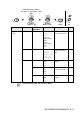
Receive
(In Fax mode
only)
(Continued)
6.Memory
Receive
On
Off
Automatically stores
any incoming faxes
in its memory if it runs
out of paper.
5-11
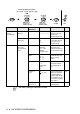
7.Polling RX Standard
Secure
Timer
Sets up your
machine to poll
another fax machine.
5-12
2.Setup Send
(In Fax mode
only)
1.Contrast Auto
Light
Dark
Changes the
lightness or darkness
of faxes you send.
6-6
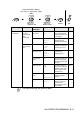
2.Fax
Resolution
Standard
Fine
S.Fine
Photo
Sets the default
resolution for
outgoing faxes.
6-7
3.Delayed
Fax
— Set the time of day in
24 hour format that
the delayed faxes will
be sent.
6-14
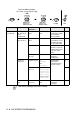
4.Batch TX On
Off
Combines delayed
faxes to the same fax
number at the same
time of day into one
transmission.
6-15
5.Real Time
TX
Off
On
Next Fax Only
You can send a fax
without using the
memory.
6-9
6.Polled TX Standard
Secure
Sets up the
document on your
machine to be
retrieved by another
fax machine.
6-16
Main Menu Submenu Menu
Selections
Options Descriptions Page
The factory settings are shown in Bold.
to
accept
to
exit
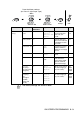
Press the Menu numbers.
(ex. Press 1, 2 for Paper Type)
—
OR
—
Select & Set Select & Set