
User`s guide



5 - 3 QUICK-DIAL NUMBERS AND DIALLING OPTIONS
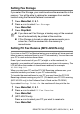
Setting up Groups for Broadcasting
Groups allow you to send the same fax message to many fax
numbers by pressing only a few keys (
Search/Speed Dial, #, the
two-digit number, and
Mono Start). First, you’ll need to store each
fax number as a Speed-Dial number.
Then, you can combine them into a Group. Each Group uses up a
Speed-Dial number. You can have up to six Groups, or you can
assign up to 19 numbers (MFC-215C) or up to 79 numbers
(MFC-425CN) to one large Group.
(See Storing Speed-Dial numbers on page 5-1 and Broadcasting
(Monochrome only) on page 3-11.)
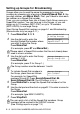
1
Press Menu/Set, 2, 3, 2.
2
Use the dial pad to enter the
two-digit Speed-Dial number where
you want to store the Group.
Press
Menu/Set.
(For example, press
07 and Menu/Set.)
3
Use the dial pad to enter the Group
number (1 to 6).
Press
Menu/Set.
(For example, press
1 for Group 1.)
4
To include Speed-Dial numbers in
the Group, press them as follows:
For example, for Speed-Dial
numbers 05 and 09. Press
Search/Speed Dial
,
05
,
Search/Speed Dial
,
09
. The LCD shows:
#05#09
.
5
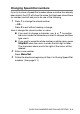
Press Menu/Set to accept the Speed-Dial numbers for this
Group.
6
Use the dial pad and the chart on page B-11 to enter a name for
the Group.
Press
Menu/Set.
(For example, type NEW CLIENTS).
7
Press Stop/Exit.
Please select a Speed-Dial number that has not already been
used to store a number.
The Group number must be between 1 and 6.
You can print a list of all the Speed-Dial numbers. Group
numbers will be marked in the GROUP column.
(See Printing reports on page 7-3.)
Set Quick-Dial
2.Setup Groups
Setup Groups
Speed-Dial? #
Setup Groups
Setup Group:G01
Setup Groups
G01:#05#09