
User Manual

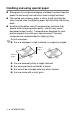

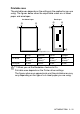
Table Of Contents
- USER’S GUIDE MFC-210C/MFC-410CN
- APPROVAL INFORMATION
- Compilation and Publication Notice
- Safety precautions
- Choosing a location
- Quick Reference Guide
- Table of Contents
- 1 Introduction
- 2 Getting started
- 3 Setup Send
- How to enter Fax mode
- How to dial
- How to Fax (B&W and Colour)
- Basic sending operations
- Advanced sending operations
- Broadcasting (Not available for colour faxes)
- Overseas Mode
- Delayed Fax (Not available for colour faxes) (MFC-410CN only)
- Delayed Batch Transmission (Not available for colour faxes) (MFC-410CN only)
- Setup for Polled Transmit (Standard) (Not available for colour faxes) (MFC-410CN only)
- Setup for Polled Transmit with Secure Code (Not available for colour faxes) (MFC-410CN only)
- TX Lock (Key Lock for some countries)
- Faxing letter size documents from the scanner glass
- 4 Setup Receive
- Basic receiving operations
- 5 Quick-Dial numbers and dialling options
- 6 Remote Fax Options (MFC-410CN only) (Not available for colour faxes)
- 7 Printing reports
- 8 Making copies
- 9 Walk-Up PhotoCapture Center™
- 10 Important information
- 11 Troubleshooting and routine maintenance
- Appendix A
- Telephone Service for Australia
- Telephone Service for New Zealand
- Telephone Service for Some Countries
- Advanced receiving operations
- Connecting an external device to your MFC
- Appendix B
- Glossary
- Specifications
- Index
- Remote Retrieval Access card (MFC-410CN only)
- brother ARL/ASA/NZ

1 - 8 INTRODUCTION
Handling and using special paper
■
Store paper in its original packaging, and keep it sealed. Keep the
paper flat and away from moisture, direct sunlight and heat.
■
The coated side of glossy paper is shiny. Avoid touching the
shiny (coated) side. Load glossy paper with the shiny side facing
down.
■
Avoid touching either side of transparencies, because they
absorb water and perspiration easily, and this may cause
decreased output quality. Transparencies designed for laser
printers/copiers may stain your next document. Use only
transparencies recommended for inkjet printing.
Do not use paper:
■
that are damaged, curled, wrinkled, or irregularly shaped
■
that are extremely shiny or highly textured
■
that were previously printed by a printer
■
that cannot be arranged uniformly when stacked
■
that are made with a short grain
2 mm or
longer
2 mm or
longer