
User Manual


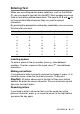
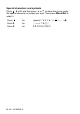

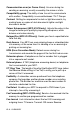

Table Of Contents
- USER’S GUIDE MFC-210C/MFC-410CN
- APPROVAL INFORMATION
- Compilation and Publication Notice
- Safety precautions
- Choosing a location
- Quick Reference Guide
- Table of Contents
- 1 Introduction
- 2 Getting started
- 3 Setup Send
- How to enter Fax mode
- How to dial
- How to Fax (B&W and Colour)
- Basic sending operations
- Advanced sending operations
- Broadcasting (Not available for colour faxes)
- Overseas Mode
- Delayed Fax (Not available for colour faxes) (MFC-410CN only)
- Delayed Batch Transmission (Not available for colour faxes) (MFC-410CN only)
- Setup for Polled Transmit (Standard) (Not available for colour faxes) (MFC-410CN only)
- Setup for Polled Transmit with Secure Code (Not available for colour faxes) (MFC-410CN only)
- TX Lock (Key Lock for some countries)
- Faxing letter size documents from the scanner glass
- 4 Setup Receive
- Basic receiving operations
- 5 Quick-Dial numbers and dialling options
- 6 Remote Fax Options (MFC-410CN only) (Not available for colour faxes)
- 7 Printing reports
- 8 Making copies
- 9 Walk-Up PhotoCapture Center™
- 10 Important information
- 11 Troubleshooting and routine maintenance
- Appendix A
- Telephone Service for Australia
- Telephone Service for New Zealand
- Telephone Service for Some Countries
- Advanced receiving operations
- Connecting an external device to your MFC
- Appendix B
- Glossary
- Specifications
- Index
- Remote Retrieval Access card (MFC-410CN only)
- brother ARL/ASA/NZ

APPENDIX B B - 11
Entering Text
When you are setting certain menu selections, such as the Station
ID, you may need to type text into the MFC. Most number keys have
three or four letters printed above them. The keys for
0
,
#
and do
not have printed letters because they are used for special
characters.
By pressing the appropriate number key repeatedly, you can access
the character you want.
Inserting spaces
To enter a space in the fax number, press once between
numbers. To enter a space in the name, press twice between
characters.
Making corrections
If you entered a letter incorrectly and want to change it, press to
move the cursor under the incorrect character. Then press
Stop/Exit
. All letters above and to the right of the cursor will be
deleted. Re-enter the correct character. You can also back up and
type over incorrect letters.
Repeating letters
If you need to enter a character that is on the same key as the
previous character, press to move the cursor to the right before
you press the key again.
Press Key one time two times three times four times
2 ABC2
3 DEF3
4 GH I 4
5 JKL5
6 MNO6
7 PQRS
8 TUV8
9 WX Y Z
▲
▲
▲
▲