
Quick Setup Guide


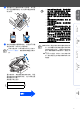
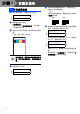
Table Of Contents

8
安装本设备
1 循环清洁结束后,液晶显示屏上显示 :
2 确保纸张已装入纸盒。
按启用色彩键。
本设备开始打印打印质量测试 (只有在第一
个墨盒安装后运行)。
3 通过打印在纸上的短线,检查四种色块的质
量。
(黑色 / 青色 / 黄色 / 品红色)
打印结束后,请避免立即接触纸张打印
面,打印面还未完全干,会弄脏您的手
指。
4 液晶显示屏上显示:
5 如果所有的线条都清晰可见,请按拨号盘上
的数字 1 结束质量检查。
--- 或 ---
如果发现有线条缺失,请按拨号盘上的数字
2 然后转到
6。
6 液晶显示屏会询问黑白和彩色打印是否质量
良好。 在拨号盘上按数字 1 或 2。
为黑白和彩色打印选择数字 1(Yes) 或数字
2(No) 后,液晶显示屏上显示:
按数字 1(Yes),本设备开始清洗该颜色通
道。
清理完成后,按启用彩色键。本设备再次打
印质量测试然后回到步骤
3。
5
打印质量检查
Set Paper and
Press Start
Is Quality OK?
1.Yes 2.No
Print Quality Check
1. Check the quality of the four- color blo cks formed by th e short lines.
2. If all t he short lines are clear an d visible, the quality is acceptabl e. the quality is acc eptable.
Select (Yes). If you can see missing sh ort lin es, sele ct (No) to begin the color cleaning proces s
and follo w the promp ts on the LCD.
Black OK?
1.Yes 2.No
Start Cleaning?
1.Yes 2.No
清晰
缺失
步骤 1