
User Manual


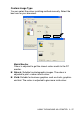

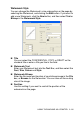

Table Of Contents
- SOFTWARE USER’S GUIDE
- Table of Contents
- 1 Using the machine as a printer (For Windows®)
- Using the Brother printer driver
- Features
- Choosing the right type of paper
- Printing a document
- Simultaneous printing and faxing
- Clearing data from the memory
- Checking the Print Quality
- Printer operation key
- Status Monitor (Windows® only)
- Printer driver settings (Windows® only)
- How to access the printer driver settings
- Basic tab
- Advanced tab
- 2 How to scan using Windows®
- Scanning a document (For Windows® XP only)
- Scanning a document
- Using the Scan key (For USB cable users)
- Using ScanSoft® PaperPort® 9.0SE and OmniPage® OCR
- 3 Using the ControlCenter2.0 (For Windows®)
- 4 Using MFC Remote Setup (For Windows®)
- 5 Using Brother PC-FAX software (For Windows®) (not available for DCP-110C and DCP-310CN)
- PC-FAX sending
- Speed-Dial setup
- Brother Address Book
- Setting up a Member in the Address Book
- Setting up a Group for Broadcasting
- Editing Member information
- Deleting a Member or Group
- Exporting the Address Book
- Importing to the Address Book
- Setting up a Cover Page
- Entering Cover Page Information
- Sending a file as a PC-FAX using the Facsimile style user interface
- Sending a file as a PC-FAX using the Simple style user interface
- Setting up PC-FAX receiving (MFC-410CN, MFC-620CN, MFC-5440CN, MFC-5840CN and MFC-3340CN only)
- 6 Using the PhotoCapture Center™ from your PC (For Windows®) (not available for MFC-5440CN and MFC-3240C)
- 7 Network Scanning (For Windows®) (not available for MFC-3240C, MFC-210C and DCP-110C)
- 8 Using your machine with a Macintosh®
- Setting up your USB-equipped Apple® Macintosh®
- Using the Brother printer driver with your Apple® Macintosh® (Mac OS® X)
- Using the Brother printer driver with your Apple® Macintosh® (Mac OS® 8.6-9.2)
- Sending a fax from your Macintosh® application (not abailable for DCP-110C and DCP-310CN)
- Scanning from a Macintosh® (not available for Mac OS® 8.6)
- Configuring Network Scanning
- Using Presto!® PageManager®
- Using the ControlCenter2.0 (For Mac OS® X 10.2.4 or greater)
- MFC Remote Setup (Mac OS® X 10.2.4 or greater) (not available for DCP-110C, DCP-310CN and MFC-210C)
- Using the PhotoCapture Center™ from a Macintosh® (not available for MFC-3240C and MFC-5440CN)
- Index
- brother UK/IRE/SAF/PAN NORDIC

USING THE MACHINE AS A PRINTER 1 - 17
Custom Image Type
You can select the colour matching method manually. Select the
best one for your document.
Match Monitor
Colour is adjusted to get the closest colour match to the PC
monitor.
■
Natural: Suitable for photographic images. The colour is
adjusted to print a more natural colour.
■
Vivid: Suitable for business graphics such as charts, graphics
and text. The colour is adjusted to give more vivid colour.