
Quick Start Manual






Table Of Contents
- YL4MFC_US.PDF
- Front Cover
- Inside Front Cover
- Brother Numbers
- Ordering Accessories and Supplies
- Quick Reference Guide
- How to Access the Complete Owner's Manual (For MFC-4800 Only)
- How to Access Brother Support (For MFC-4800 Only) (For Windows® Only)
- Download the Printer Driver from the Brother Web Site (For FAX-2900 and FAX-3800 Only)
- Table of Contents
- 1.Introduction
- 2.Assembly and Connections
- Packing List
- Choosing a Location
- Assembly
- Installing the Drum Unit Assembly (with Toner Cartridge)
- Setting Up the FAX/MFC
- Loading Paper
- Acceptable Paper
- Paper Capacity of Multi-purpose Sheet Feeder
- Connecting an External Telephone
- Connecting an External Telephone Answering Device (TAD)
- Special Line Considerations
- Multi-Line Connections (PBX)
- Custom Features on Your Phone Line
- 3.On-Screen Programming
- 4.Initial Setup
- Getting Started
- Setting the Paper Size
- Setting the Date and Time
- Setting the Station ID
- Setting the Ring Volume
- Setting the Beeper Volume
- Setting the Speaker Volume
- Setting the Handset Volume
- Choosing the Handset Volume (For Volume Amplify)
- Setting Volume Amplify
- Memory Storage
- Turning On Automatic Daylight Savings Time
- Toner Save
- Sleep Mode
- Setting Tone/Pulse Dialing Mode (For Canada Only)
- Getting Started
- 5.Setup Receive
- 6.Setup Send
- 7.Auto Dial Numbers and Dialing Options
- 8.Telephone Services
- 9.Remote Fax Options
- 10.Printing Reports
- 11.Making Copies
- 12.Important Information
- 13.Troubleshooting and Routine Maintenance
- Glossary
- Specifications
- Index
- Remote Retrieval Access Card
- Rear Cover
REMOTE FAX OPTIONS
9 - 4
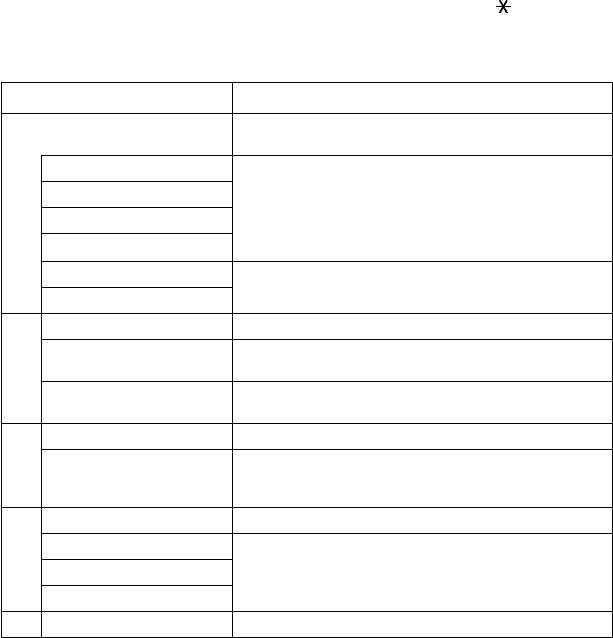
Remote Commands
Follow the commands below to access features remotely. When you call the
FAX/MFC and enter your Remote Retrieval Access Code (1 5 9 ), the system
will signal you with two short beeps to enter a remote command.
Remote Commands Operation Details
95 Changing Fax Forwarding
/Paging setting
1 OFF If you hear one long beep, the change is accepted. If you hear three
short beeps, you cannot change it because the conditions have not
been met (Example: registering paging number). You can register
your fax forwarding number by using 4. FAX FWD NO. (see page
9-5). Once you have registered the number, the FAX/MFC will
change automatically to FAXFWD:ON mode.
2 Fax Forwarding
3 Paging
4 FAX FWD No.
6 Fax Storage ON You can turn FAX STORAGE to ON or OFF.
7 Fax Storage OFF
96 Retrieve a fax
2 Retrieve all faxes Enter the number of a remote fax machine to receive stored fax
messages. (See page 9-5.)
3 Erase faxes from the memory If you hear one long beep, you can erase fax message(s) from the
memory.
97 Check the Receiving Status
1 FAX You can check whether your FAX/MFC has received any faxes.
If yes, you will hear one long beep. If no, you will hear three short
beeps.
98 Change the Receive Mode
1 TAD: ANSWER MACH. If you hear one long beep, you can change the Receive Mode.
If you hear three short beeps, you cannot change it.
2 FAX/TEL
3.FAX ONLY
90 Exit After a long beep, you can exit Remote Retrieval.