
Quick Start Manual




Table Of Contents
- YL4MFC_US.PDF
- Front Cover
- Inside Front Cover
- Brother Numbers
- Ordering Accessories and Supplies
- Quick Reference Guide
- How to Access the Complete Owner's Manual (For MFC-4800 Only)
- How to Access Brother Support (For MFC-4800 Only) (For Windows® Only)
- Download the Printer Driver from the Brother Web Site (For FAX-2900 and FAX-3800 Only)
- Table of Contents
- 1.Introduction
- 2.Assembly and Connections
- Packing List
- Choosing a Location
- Assembly
- Installing the Drum Unit Assembly (with Toner Cartridge)
- Setting Up the FAX/MFC
- Loading Paper
- Acceptable Paper
- Paper Capacity of Multi-purpose Sheet Feeder
- Connecting an External Telephone
- Connecting an External Telephone Answering Device (TAD)
- Special Line Considerations
- Multi-Line Connections (PBX)
- Custom Features on Your Phone Line
- 3.On-Screen Programming
- 4.Initial Setup
- Getting Started
- Setting the Paper Size
- Setting the Date and Time
- Setting the Station ID
- Setting the Ring Volume
- Setting the Beeper Volume
- Setting the Speaker Volume
- Setting the Handset Volume
- Choosing the Handset Volume (For Volume Amplify)
- Setting Volume Amplify
- Memory Storage
- Turning On Automatic Daylight Savings Time
- Toner Save
- Sleep Mode
- Setting Tone/Pulse Dialing Mode (For Canada Only)
- Getting Started
- 5.Setup Receive
- 6.Setup Send
- 7.Auto Dial Numbers and Dialing Options
- 8.Telephone Services
- 9.Remote Fax Options
- 10.Printing Reports
- 11.Making Copies
- 12.Important Information
- 13.Troubleshooting and Routine Maintenance
- Glossary
- Specifications
- Index
- Remote Retrieval Access Card
- Rear Cover
ii
Ordering Accessories and Supplies
For best quality results use only genuine Brother accessories, available at most
Brother retailers. If you cannot find the accessory you need and you have a Visa,
MasterCard, Discover or American Express credit card, you can order
accessories directly from Brother. (In the USA, you can visit us online for a
complete selection of Brother accessories and supplies available for purchase.)
**
Multi-Function Link
®
Pro Suite is NOT available on floppy disks.
IMPORTANT
For technical and operational assistance, you must call the country where you
purchased the FAX/MFC. Calls must be made
from within
that country.
In USA:
1-888-879-3232 (voice)
1-800-947-1445 (fax)
http://www.brothermall.com
In Canada:
1-800-668-2768 (voice)
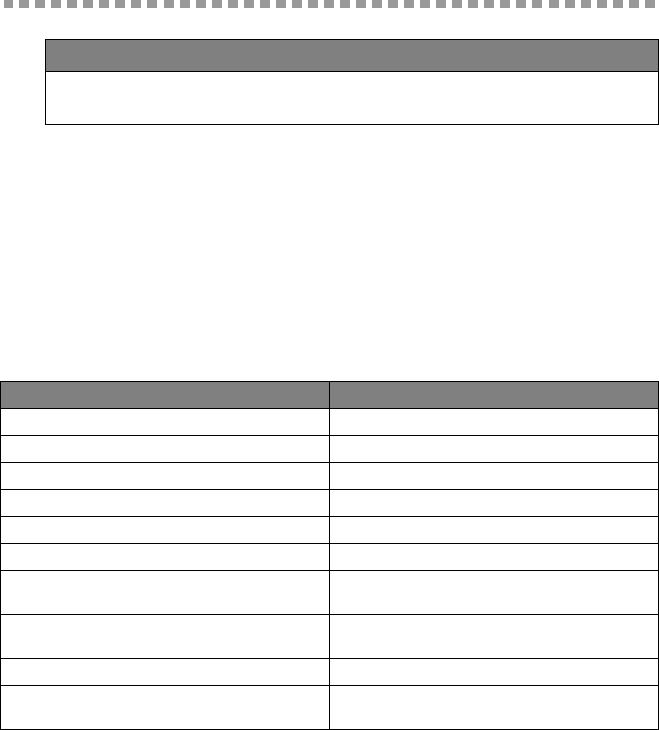
Description Item
Laser Fax Toner TN-250
Laser Fax Drum DR-250
Telephone Line Cord LG3077001
Telephone Handset LE0446011
Handset Curled Cord UG3543011
Paper Support and Document Support LE1931008
Power Protector for A/C Power and Phone Line
Surges and Voltage Spikes (2 Outlets)
QPD120
Power Protector for A/C Power and Phone Line
Surges and Voltage Spikes (8 Outlets)
FX 120
Owner’s Manual LE1933001
IEEE-1284 Bi-directional
Parallel Cable
F2A046-10
ORDERING ACCESSORIES AND SUPPLIES