
Quick Start Manual


Table Of Contents
- YL4MFC_US.PDF
- Front Cover
- Inside Front Cover
- Brother Numbers
- Ordering Accessories and Supplies
- Quick Reference Guide
- How to Access the Complete Owner's Manual (For MFC-4800 Only)
- How to Access Brother Support (For MFC-4800 Only) (For Windows® Only)
- Download the Printer Driver from the Brother Web Site (For FAX-2900 and FAX-3800 Only)
- Table of Contents
- 1.Introduction
- 2.Assembly and Connections
- Packing List
- Choosing a Location
- Assembly
- Installing the Drum Unit Assembly (with Toner Cartridge)
- Setting Up the FAX/MFC
- Loading Paper
- Acceptable Paper
- Paper Capacity of Multi-purpose Sheet Feeder
- Connecting an External Telephone
- Connecting an External Telephone Answering Device (TAD)
- Special Line Considerations
- Multi-Line Connections (PBX)
- Custom Features on Your Phone Line
- 3.On-Screen Programming
- 4.Initial Setup
- Getting Started
- Setting the Paper Size
- Setting the Date and Time
- Setting the Station ID
- Setting the Ring Volume
- Setting the Beeper Volume
- Setting the Speaker Volume
- Setting the Handset Volume
- Choosing the Handset Volume (For Volume Amplify)
- Setting Volume Amplify
- Memory Storage
- Turning On Automatic Daylight Savings Time
- Toner Save
- Sleep Mode
- Setting Tone/Pulse Dialing Mode (For Canada Only)
- Getting Started
- 5.Setup Receive
- 6.Setup Send
- 7.Auto Dial Numbers and Dialing Options
- 8.Telephone Services
- 9.Remote Fax Options
- 10.Printing Reports
- 11.Making Copies
- 12.Important Information
- 13.Troubleshooting and Routine Maintenance
- Glossary
- Specifications
- Index
- Remote Retrieval Access Card
- Rear Cover
2 - 2
ASSEMBLY AND CONNECTIONS
Choosing a Location
Place your FAX/MFC on a flat, stable surface, such as a desk. Select a place that
is free of vibration and shocks. Locate the FAX/MFC near a telephone jack and
a standard, grounded power outlet. Make sure nothing blocks the flow of air
from the fan on the right side of the FAX/MFC.
WARNING
■ Never install telephone wiring during a lightning storm.
■ We recommend that this product be used with a surge protection device to protect the
product against lightning storms.
■ Never install a telephone jack in a wet location unless the jack is specifically designed
for a wet location.
■ Never touch telephone wires or terminals that are not insulated unless the telephone
line has been disconnected at the network interface.
■ Use caution when installing or modifying telephone lines.
■ Avoid using a telephone (other than a cordless type) during an electrical storm. There
may be a remote risk of electric shock from lightning.
■ Do not use the telephone to report a gas leak in the vicinity of the leak.
■ For PLUGGABLE EQUIPMENT, the socket-outlet should be installed near the
equipment and should be easily accessible.
■ To reduce the risk of shock or fire, use only a No. 26 AWG or larger
telecommunications line cord.
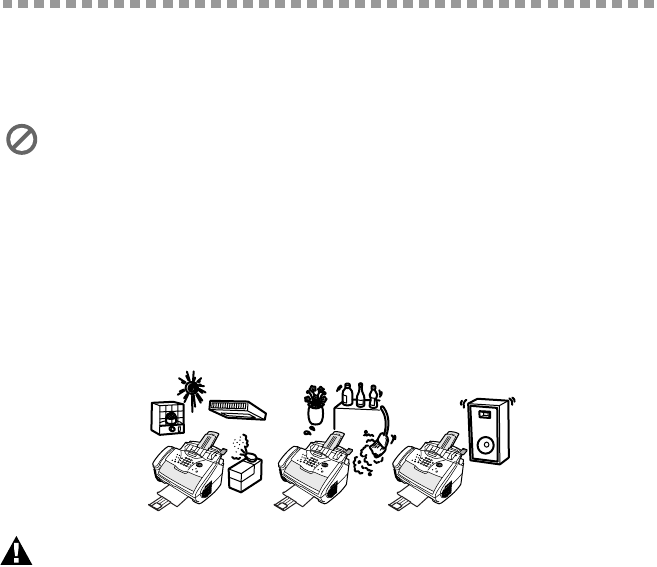
Avoid placing your FAX/MFC in a high-traffic area. Do not place near heaters,
air conditioners, water, chemicals, or refrigerators. Do not expose the FAX/
MFC to direct sunlight, excessive heat, moisture, or dust. Make sure nothing
blocks the flow of air from the fan on the right side of the FAX/MFC. Do not
connect your FAX/MFC to electrical outlets controlled by wall switches or
automatic timers. Disruption of power can wipe out information in the unit’s
memory. Do not connect your FAX/MFC to electrical outlets on the same
circuit as large appliances or other equipment that might disrupt the power
supply. Avoid interference sources, such as speakers or the base units of
cordless phones.
NO !
NO !
NO !