
Quick Start Manual
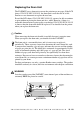

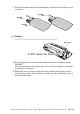
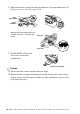


Table Of Contents
- YL4MFC_US.PDF
- Front Cover
- Inside Front Cover
- Brother Numbers
- Ordering Accessories and Supplies
- Quick Reference Guide
- How to Access the Complete Owner's Manual (For MFC-4800 Only)
- How to Access Brother Support (For MFC-4800 Only) (For Windows® Only)
- Download the Printer Driver from the Brother Web Site (For FAX-2900 and FAX-3800 Only)
- Table of Contents
- 1.Introduction
- 2.Assembly and Connections
- Packing List
- Choosing a Location
- Assembly
- Installing the Drum Unit Assembly (with Toner Cartridge)
- Setting Up the FAX/MFC
- Loading Paper
- Acceptable Paper
- Paper Capacity of Multi-purpose Sheet Feeder
- Connecting an External Telephone
- Connecting an External Telephone Answering Device (TAD)
- Special Line Considerations
- Multi-Line Connections (PBX)
- Custom Features on Your Phone Line
- 3.On-Screen Programming
- 4.Initial Setup
- Getting Started
- Setting the Paper Size
- Setting the Date and Time
- Setting the Station ID
- Setting the Ring Volume
- Setting the Beeper Volume
- Setting the Speaker Volume
- Setting the Handset Volume
- Choosing the Handset Volume (For Volume Amplify)
- Setting Volume Amplify
- Memory Storage
- Turning On Automatic Daylight Savings Time
- Toner Save
- Sleep Mode
- Setting Tone/Pulse Dialing Mode (For Canada Only)
- Getting Started
- 5.Setup Receive
- 6.Setup Send
- 7.Auto Dial Numbers and Dialing Options
- 8.Telephone Services
- 9.Remote Fax Options
- 10.Printing Reports
- 11.Making Copies
- 12.Important Information
- 13.Troubleshooting and Routine Maintenance
- Glossary
- Specifications
- Index
- Remote Retrieval Access Card
- Rear Cover

GLOSSARY
G - 3
LCD (liquid crystal display) The display screen on the FAX/MFC that shows interactive
messages during On-Screen Programming. It defaults to the date and time when the machine
is idle.
manual fax When you press Hook—OR—lift the handset so you can hear the receiving fax
machine answer before you press Fax Start to begin transmisson.
Menu Mode The programming mode for changing the settings of your FAX/MFC.
Multi-Function Link
®
Pro Suite Software application (For MFC-4800 Only) Turns your
MFC into a printer and a scanner and enables PC faxing using the MFC.
Next Fax Reservation Accepts the next document in the document feeder for transmission while
the Memory is full.
One Touch Keys on the control panel of FAX models where you can store numbers for easy
dialing. You must use a separate key for each number.
Out of Paper Reception Receives faxes into the FAX/MFC’s memory when the machine is out
of paper.
Overseas Mode Makes temporary changes to the fax tones to accommodate noise and static on
overseas phone lines.
Paging Feature enables your fax unit to call your pager when a fax is received into its memory.
Pause Allows you to place a 3.5 second delay in the dialing sequence stored on One Touch and
Speed Dial numbers.
Photo mode A resolution setting that uses varying shades of gray for the best representation of
photographs.
Polling The process of a fax machine calling another fax machine to retrieve waiting fax
messages.
printer alarm Audible alarm when the printer is not able to print.
Pulse (For Canada only) A form of rotary dialing on a telephone line.
Real Time Transmission When memory is full, you can send documents in real time.
Reduction reduces the size of incoming faxes.
Remaining jobs You can check which jobs are waiting in memory and cancel jobs individually.
Remote Activation allows you to transfer a fax call, answered at an extension phone, to the
FAX/MFC.
Remote Retrieval Access Code The four-digit code (159 ) that allows you to call and access
your FAX/MFC from a remote location.
Resolution The number of vertical and horizontal lines per inch. See: Standard, Fine, Super Fine
and Photo.
Ring Delay The number of rings before the FAX/MFC answers in FAX or FAX/TEL mode.
Ring Volume Volume setting for the FAX/MFC’s ring.
scanning The process of sending an electronic image of an original paper document into your
computer.