
Installation Instructions






5
1
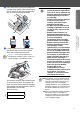
Connect the power cord.
2
Connect the telephone line cord.
Connect one end of the telephone line cord
to the socket on the machine marked LINE
and the other end to a modular wall socket.
Warning
■
The machine must be fitted with an earthed plug.
■
Since the machine is grounded through the power
outlet, you can protect yourself from potentially
hazardous electrical conditions on the telephone
network by keeping the power switched on when
you connect the machine to a telephone line.
Similarly, you can protect yourself when you want
to move your machine by disconnecting the
telephone line first and then the power cord.
4
Installing the Phone Line
and Power Cord
(Example for the U.K.)
(Example for the U.K.)
If you are sharing one phone line with an
external telephone, connect it as shown
below.
If you are sharing one phone line with an
external telephone answering machine,
connect it as shown below.
For more details, see “Connecting an
external device to your machine” in
Appendix of the User’s Guide.
(Example for the U.K.)
TAD
TAD
(Example for the U.K.)
Using the FAX as a Printer
or for PC-FAX Send
Setting Up the Machine