
Quick Setup Guide


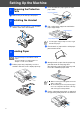

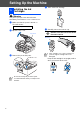
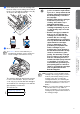
Table Of Contents
- Quick Setup Guide
- Getting Started
- Table of Contents
- Setting Up the Machine
- 1 Removing the Protective Parts
- 2 Installing the Handset
- 3 Loading Paper
- 4 Installing the Phone Line and Power Cord
- 5 Installing the Ink Cartridges
- 6 Print Quality Check
- 7 Setting the Date and Time
- 8 Setting Your Station ID
- 9 Selecting a Receive Mode (FAX-1840C only)
- 10 Selecting a Receive Mode (FAX-1940CN only)
- 11 Setting Up the Message Center (FAX-1940CN only)
- 12 Selecting Your Language (Canada only)
- 13 Sending in the Product Registration and Test Sheet (USA only)
- 14 Using the FAX as a Printer or for PC-FAX Send
- 15 Using the Network features of the FAX-1940CN
- Replacement Consumables

6
Setting Up the Machine
Warning
If ink gets in your eyes wash them with water
immediately, and if irritation occurs consult a doctor.
1
Make sure that the power is turned on.
The LCD shows:
2
Open the top cover.
3
Remove the protective parts.
4
Take out the ink cartridge.
5
Carefully remove the bottom cap.
DO NOT touch the area shown in the
illustration below.
Keep the ink cartridge in an upright position
when you insert it into the slot.
5
Installing the Ink
Cartridges
No Cartridge
Do not throw away the protective parts.
You will need them when you transport the
machine.
Top Cover
If the cartridge cover comes off when you
open the bag the cartridge will not be
damaged.
Opening
OK
OK
OK