
Quick Setup Guide


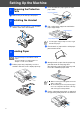

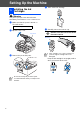
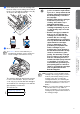
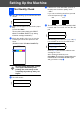
Table Of Contents
- Quick Setup Guide
- Getting Started
- Table of Contents
- Setting Up the Machine
- 1 Removing the Protective Parts
- 2 Installing the Handset
- 3 Loading Paper
- 4 Installing the Phone Line and Power Cord
- 5 Installing the Ink Cartridges
- 6 Print Quality Check
- 7 Setting the Date and Time
- 8 Setting Your Station ID
- 9 Selecting a Receive Mode (FAX-1840C only)
- 10 Selecting a Receive Mode (FAX-1940CN only)
- 11 Setting Up the Message Center (FAX-1940CN only)
- 12 Selecting Your Language (Canada only)
- 13 Sending in the Product Registration and Test Sheet (USA only)
- 14 Using the FAX as a Printer or for PC-FAX Send
- 15 Using the Network features of the FAX-1940CN
- Replacement Consumables

3
Table of Contents
Setting Up the Machine
1. Removing the Protective Parts ......................................................................... 4
2. Installing the Handset........................................................................................4
3. Loading Paper ....................................................................................................4
4. Installing the Phone Line and Power Cord ...................................................... 5
5. Installing the Ink Cartridges..............................................................................6
6. Print Quality Check ............................................................................................8
7. Setting the Date and Time .................................................................................9
8. Setting Your Station ID ......................................................................................9
9. Selecting a Receive Mode (FAX-1840C only) ................................................10
10. Selecting a Receive Mode (FAX-1940CN only)..............................................11
11. Setting Up the Message Center (FAX-1940CN only).....................................11
12. Selecting Your Language (Canada only) .......................................................12
13. Sending in the Product Registration and Test Sheet (USA only)................12
14. Using the FAX as a Printer or for PC-FAX Send ...........................................13
15. Using the Network features of the FAX-1940CN ...........................................13
Replacement Consumables
Ink Cartridges .........................................................................................................14