
User Manual
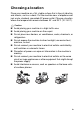
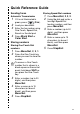
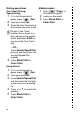


Table Of Contents
- USER'S GUIDE FAX-1840C/FAX-1940CN/MFC-3240C/MFC-3340CN
- Brother numbers
- Ordering accessories and supplies
- Safety precautions
- Choosing a location
- Quick Reference Guide
- Table of Contents
- 1 Introduction
- 2 Getting started
- Initial Setup
- General Setup
- Setting the Mode Timer (MFC-3240C and MFC-3340CN only)
- Setting the Mode Timer (FAX-1840C and FAX-1940CN only)
- Setting the Paper Type
- Setting the Paper Size
- Setting the Ring Volume
- Setting the Beeper Volume
- Setting the Speaker Volume
- Setting the Handset Volume (FAX-1840C and FAX-1940CN only)
- Choosing the Handset Volume (For Volume Amplify) (FAX-1840C and FAX-1940CN only)
- Setting Volume Amplify (FAX-1840C and FAX-1940CN only)
- Turning on Automatic Daylight Savings Time
- Setting the LCD Contrast
- 3 Setup Send
- 4 Setup Receive
- Basic receiving operations (FAX-1840C, MFC-3240C and MFC-3340CN only)
- Basic receiving operations (FAX-1940CN only)
- Choosing the Receive Mode
- Setting the Ring Delay
- Setting Toll Saver (Msg Ctr mode)
- Setting the F/T Ring Time (Fax/Tel mode only)
- Setting the Fax/Tel Announcement (FAX-1940CN only)
- Easy Receive (MFC-3240C and MFC-3340CN only)
- Easy Receive (FAX-1840C and FAX-1940CN only)
- Printing a reduced incoming fax (Auto Reduction)
- Receiving a fax at the end of a conversation
- Printing a fax from the memory
- Polling
- 5 Quick-Dial numbers and dialing options
- 6 Remote Fax Options (Not available for color faxes)
- 7 Message Center (FAX-1940CN only)
- Message Center mode
- Setting up the Message Center
- Recording Message Center Outgoing Message
- Activating Message Center mode
- Message indicator
- Playing voice messages
- Printing a fax message
- Erasing incoming messages
- Setting Maximum Time for incoming messages
- Setting Toll Saver
- ICM Recording Monitor
- Recording a conversation
- Record Fax/Tel Outgoing Announcement (F/T OGM)
- Message Center mode
- 8 Printing reports
- 9 Making copies
- 10 Walk-Up PhotoCapture Center™ (MFC-3340CN only)
- 11 Important information
- Standard telephone and FCC Notices These notices are in effect on models sold and used in the United States only.
- Federal Communications Commission (FCC) Declaration of Conformity (USA only)
- Industry Canada Compliance Statement (Canada only)
- For your safety
- LAN connection (FAX-1940CN and MFC-3340CN only)
- Important safety instructions
- Trademarks
- 12 Troubleshooting and routine maintenance
- Appendix A
- Appendix B
- Glossary
- Specifications
- Product description
- General
- Print media
- Copy
- PhotoCapture Center™ (MFC-3340CN only)
- Fax
- Scanner (MFC-3240C and MFC-3340CN only)
- Printer
- Interfaces
- Computer requirements
- Consumable items
- Network (LAN) (FAX-1940CN and MFC-3340CN only)
- Optional External Wireless Print/Scan Server (NC-2200w) (MFC-3240C and MFC-3340CN only)
- Index
- Remote Retrieval Access card (FAX-1940CN only)
- Remote Retrieval Access card (FAX-1840C, MFC-3240C and MFC-3340CN only)
- brother USA/CAN

xviii
Caller ID............................................................................A-5
Viewing Caller ID List .................................................A-6
Printing Caller ID List..................................................A-6
Advanced receiving operations ........................................A-7
Operation from extension telephones.........................A-7
Fax/Tel mode when power key is On .........................A-8
Fax/Tel mode when power key is Off .........................A-8
Using a cordless external handset .............................A-9
Changing the remote codes .......................................A-9
Connecting an external device to your machine.............A-10
Connecting an external telephone............................A-10
Connecting an external telephone answering
device (TAD) ........................................................A-11
Sequence .............................................................A-11
Connections .........................................................A-12
Recording outgoing message (OGM) on
an external TAD ...............................................A-13
Special line considerations.......................................A-14
Roll over phone lines............................................A-14
Two-line phone system ........................................A-14
Converting telephone wall outlets ........................A-15
Installing machine, external two-line TAD and
two-line telephone ............................................A-16
Multi-line connections (PBX) ....................................A-17
If you are installing the machine to work
with a PBX........................................................A-17
Custom features on your phone line.........................A-17
B
Appendix B .......................................................................... B-1
On-screen programming...................................................B-1
Menu table..................................................................B-1
Memory storage..........................................................B-1
Navigation keys ................................................................B-2
Entering Text............................................................B-12
Inserting spaces ...................................................B-12
Making corrections ...............................................B-12
Repeating letters ..................................................B-12
Special characters and symbols...........................B-13
G
Glossary .............................................................................. G-1