
User Manual


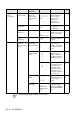
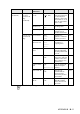
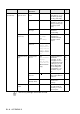
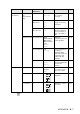
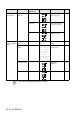
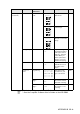

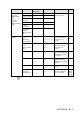
Table Of Contents
- USER'S GUIDE FAX-1840C/FAX-1940CN/MFC-3240C/MFC-3340CN
- Brother numbers
- Ordering accessories and supplies
- Safety precautions
- Choosing a location
- Quick Reference Guide
- Table of Contents
- 1 Introduction
- 2 Getting started
- Initial Setup
- General Setup
- Setting the Mode Timer (MFC-3240C and MFC-3340CN only)
- Setting the Mode Timer (FAX-1840C and FAX-1940CN only)
- Setting the Paper Type
- Setting the Paper Size
- Setting the Ring Volume
- Setting the Beeper Volume
- Setting the Speaker Volume
- Setting the Handset Volume (FAX-1840C and FAX-1940CN only)
- Choosing the Handset Volume (For Volume Amplify) (FAX-1840C and FAX-1940CN only)
- Setting Volume Amplify (FAX-1840C and FAX-1940CN only)
- Turning on Automatic Daylight Savings Time
- Setting the LCD Contrast
- 3 Setup Send
- 4 Setup Receive
- Basic receiving operations (FAX-1840C, MFC-3240C and MFC-3340CN only)
- Basic receiving operations (FAX-1940CN only)
- Choosing the Receive Mode
- Setting the Ring Delay
- Setting Toll Saver (Msg Ctr mode)
- Setting the F/T Ring Time (Fax/Tel mode only)
- Setting the Fax/Tel Announcement (FAX-1940CN only)
- Easy Receive (MFC-3240C and MFC-3340CN only)
- Easy Receive (FAX-1840C and FAX-1940CN only)
- Printing a reduced incoming fax (Auto Reduction)
- Receiving a fax at the end of a conversation
- Printing a fax from the memory
- Polling
- 5 Quick-Dial numbers and dialing options
- 6 Remote Fax Options (Not available for color faxes)
- 7 Message Center (FAX-1940CN only)
- Message Center mode
- Setting up the Message Center
- Recording Message Center Outgoing Message
- Activating Message Center mode
- Message indicator
- Playing voice messages
- Printing a fax message
- Erasing incoming messages
- Setting Maximum Time for incoming messages
- Setting Toll Saver
- ICM Recording Monitor
- Recording a conversation
- Record Fax/Tel Outgoing Announcement (F/T OGM)
- Message Center mode
- 8 Printing reports
- 9 Making copies
- 10 Walk-Up PhotoCapture Center™ (MFC-3340CN only)
- 11 Important information
- Standard telephone and FCC Notices These notices are in effect on models sold and used in the United States only.
- Federal Communications Commission (FCC) Declaration of Conformity (USA only)
- Industry Canada Compliance Statement (Canada only)
- For your safety
- LAN connection (FAX-1940CN and MFC-3340CN only)
- Important safety instructions
- Trademarks
- 12 Troubleshooting and routine maintenance
- Appendix A
- Appendix B
- Glossary
- Specifications
- Product description
- General
- Print media
- Copy
- PhotoCapture Center™ (MFC-3340CN only)
- Fax
- Scanner (MFC-3240C and MFC-3340CN only)
- Printer
- Interfaces
- Computer requirements
- Consumable items
- Network (LAN) (FAX-1940CN and MFC-3340CN only)
- Optional External Wireless Print/Scan Server (NC-2200w) (MFC-3240C and MFC-3340CN only)
- Index
- Remote Retrieval Access card (FAX-1940CN only)
- Remote Retrieval Access card (FAX-1840C, MFC-3240C and MFC-3340CN only)
- brother USA/CAN

APPENDIX B B - 9
4.
PhotoCapture
(Continued)
5.True2Life On
Off
1.
White
Balance
- +
- +
- +
- +
- +
Adjusts the hue of the
white areas.
10-10
2.
Sharpness
- +
- +
- +
- +
- +
Enhances the detail
of the image.
3.
Color
Density
- +
- +
- +
- +
- +
Adjusts the total
amount of color in the
image.
6.Cropping — On
Off
Crops the image
around the margin to
fit the paper size or
print size. Turn this
feature Off if you
want to print whole
images or prevent
unwanted cropping.
10-12
7.Borderless — On
Off
Expands the
printable area to fit
the edges of the
paper
10-12
8.Scan to
Card
1.Quality
B/W 200x100 dpi
B/W 200 dpi
Color 150 dpi
Color 300 dpi
Color 600 dpi
Selects the Scan
resolution for your
type of document.
2-25*
1
2.B/W File
Type
TIFF
PDF
Selects the default
file format for black
and white scanning.
2-26*
1
3.ColorFile
Type
PDF
JPEG
Selects the default
file format for color
scanning.
2-27*
1
Main Menu Submenu Menu
Selections
Options Descriptions Page
The factory settings are shown in Bold.
*
1
See the complete Software User’s Guide on the CD-ROM.