
Operation Manual


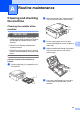
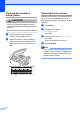
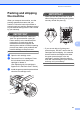
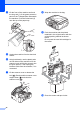

Table Of Contents
- ADVANCED USER’S GUIDE DCP-J515W DCP-J715W
- User's Guides and where do I find it?
- Table of Contents
- 1 General setup
- 2 Printing reports
- 3 Making copies
- Copy settings
- Stop copying
- Changing copy speed and quality
- Enlarging or reducing the copied image
- Making N in 1 copies or a poster (Page Layout)
- Sorting copies using the ADF (DCP-J715W only)
- Adjusting Density
- Ink Save Mode
- Book Copy
- Watermark Copy
- Setting your changes as a new default
- Restoring all settings to the factory settings
- Copy settings
- 4 Printing photos from a memory card or USB Flash memory drive
- 5 Printing photos from a camera (DCP-J715W only)
- A Routine maintenance
- B Glossary
- Index
- brother UK/IRE/GEN

35
C
Printing
all photos
...........................................14
index
..................................................13
photos
................................................14
Scan to Media
Auto crop
...........................................24
memory card
......................................24
USB Flash memory
............................24
Search from Date
..................................18
Slide-Show
............................................18
Trimming
...............................................19
PictBridge
DPOF Printing
.......................................27
Power failure
..............................................1
Presto! PageManager
See Software User's Guide. See also Help
in the Presto! PageManager application.
Print
reports
.....................................................3
R
Reducing copies ........................................5
Reports
Help List
..................................................3
how to print
.............................................3
Network Configuration
............................3
User Settings
..........................................3
WLAN Report
..........................................3
S
Scanning
See Software User's Guide.
Shipping the machine
..............................31
Sleep Mode
................................................1
T
Troubleshooting
checking ink volume
.............................30
W
Windows
®
See Software User's Guide.