
Operation Manual
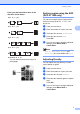
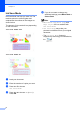
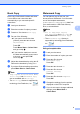



Table Of Contents
- ADVANCED USER’S GUIDE DCP-J515W DCP-J715W
- User's Guides and where do I find it?
- Table of Contents
- 1 General setup
- 2 Printing reports
- 3 Making copies
- Copy settings
- Stop copying
- Changing copy speed and quality
- Enlarging or reducing the copied image
- Making N in 1 copies or a poster (Page Layout)
- Sorting copies using the ADF (DCP-J715W only)
- Adjusting Density
- Ink Save Mode
- Book Copy
- Watermark Copy
- Setting your changes as a new default
- Restoring all settings to the factory settings
- Copy settings
- 4 Printing photos from a memory card or USB Flash memory drive
- 5 Printing photos from a camera (DCP-J715W only)
- A Routine maintenance
- B Glossary
- Index
- brother UK/IRE/GEN
Chapter 3
8
Ink Save Mode 3
Ink Save Mode can help you save ink. The
machine prints the colours lighter and
emphasises the outlines of the images as
shown below.
The amount of ink saved will vary depending
on the document.
Ink Save Mode: Off
3
Ink Save Mode: On 3
a Load your document.
b Enter the number of copies you want.
c Press a or b to choose
Ink Save Mode.
d Press d or c to choose On (or Off).
Press OK.
e If you do not want to change any
additional settings, press Mono Start or
Colour Start.
Note
• Watermark Copy, Book Copy and
Page Layout are not available with
Ink Save Mode.
• Ink Save Mode may make your
printouts look different from your original
document.
•The Ink Save Mode feature is
supported by technology from Reallusion,
Inc.