
Installation Instructions





5
h
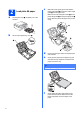
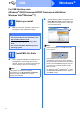
Gently push the ink cartridge until it clicks. After
all the ink cartridges are installed close the ink
cartridge cover.
6
Check the print quality
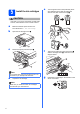
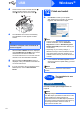
a When the preparation process has finished, the
LCD shows Set Paper and Press Start.
Press Colour Start.
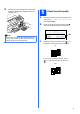
b Check the quality of the four colour blocks a
on the sheet. (black/yellow/cyan/magenta)
c If all lines are clear and visible, press (Yes)
to finish the quality check and go to step 7.
If you can see missing short lines, press
(No) and follow the steps on the LCD.
Note
The machine will prepare the ink tube system for
printing. This process will take approximately four
minutes. Do not turn off the machine.
OK
Poor
1
1