
Installation Instructions




12
Macintosh
USB
11
Install MFL-Pro Suite
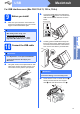
a Put the supplied installation CD-ROM into your
CD-ROM drive.
b Double-click the Start Here OSX icon to install.
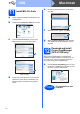
c Choose Local Connection, and then click
Next. Follow the on-screen instructions.
d Please wait, it will take a few seconds for the
software to install. After the installation, the
Brother software will search for the Brother
device.
e Choose the machine from the list, and then
click OK.
f When this screen appears, click Next.
g When the Brother Support screen appears,
click Close to finish the installation or go to
step 12.
12
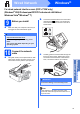
Download and install
Presto! PageManager
(DCP-J715W only)
When Presto! PageManager is installed OCR
capability is added to Brother ControlCenter2. You
can easily scan, share and organize photos and
documents using Presto! PageManager.
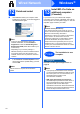
a Click the Presto! PageManager icon to go to
the Presto! PageManager download site, and
follow the on-screen instructions.
(DCP-J515W)
(DCP-J715W)
Finish
The installation is now
complete.