
Quick Start Guide






Menu en functies
61
C
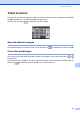
Tekst invoeren C
Druk op a, b, d of c om de gewenste cijfers of tekens te kiezen en door vervolgens herhaaldelijk
op OK te drukken tot u de bestandsnaam hebt ingevoerd.
Druk op a, b, d of c om te selecteren en druk op OK.
Speciale tekens invoegen C
Om speciale tekens in te voeren, drukt u op a, b, d of c om te selecteren en drukt u op OK.
Correcties aanbrengen C
Als u een onjuiste letter hebt ingevoerd en deze wilt corrigeren, drukt u op a, b, d of c om of
te selecteren.
Druk een paar keer op OK om de cursor onder het onjuiste teken te plaatsen. Druk dan op a, b,
d of c om te selecteren en druk op OK. Voer het juiste teken in.
OK
OK
A
K
U
10
B
L
V
2
C
M
W
3
D
N
X
4
EFGH I J
O
Y
5
P
Z
6
Q
7
R
8
S
9
T
010310
OK
OK