
User Manual

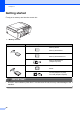


Table Of Contents
- BASIC USER’S GUIDE DCP-J125 DCP-J315W
- User's Guides and where do I find it?
- Table of Contents
- 1 General information
- 2 Loading paper
- 3 Loading documents
- 4 Making copies
- 5 Printing photos from a memory card
- 6 How to print from a computer
- 7 How to scan to a computer
- A Routine maintenance
- B Troubleshooting
- C Menu and features
- D Specifications
- Index
- brother ARL/ASA/NZ/SAF

Chapter 5
24
Getting started 5
Firmly put a memory card into the correct slot.
IMPORTANT
DO NOT insert a Memory Stick Duo™ into the lower SD slot, this may cause damage to the
machine.
1 Memory card slot
Slot Compatible memory cards
Upper slot
Memory Stick™
Memory Stick PRO™
Memory Stick Duo™
Memory Stick PRO Duo™
Memory Stick Micro™
(Adapter required)
Lower slot
SD
SDHC
mini SD (Adapter required)
micro SD (Adapter required)
1