
User`s guide


Menu and features
119
C
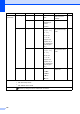
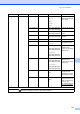
Level 1 Level 2 Level 3 Options Descriptions Page
5.Machine Info.
1.Date&Time 1.Date&Time — Puts the date and
time on the LCD.
See
2
.
2.Auto Daylight
On*
Off
Changes for Daylight
Savings Time
automatically.
See
1
.
3.Time Zone UTCXXX:XX Sets the time zone for
your country.
See
3
.
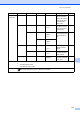
2.Serial No. — — You can check the
serial number of your
machine.
108
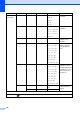
3.Page Counter
— Total
List
Copy
Print
You can check the
number of total pages
the machine has
printed during its life.
See
1
.
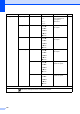
4.User Settings
— — Lists your settings.
5.Network Config
— — Lists your Network
settings.
6.Drum Dot Print
— — Prints the drum dot
check sheet.
70
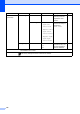
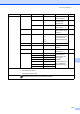
7.Parts Life 1.Drum — You can check the
percentage of a
machine part’s life
that remains
available.
(PF Kit 2 appears only
if you installed the
optional paper tray.)
See
1
.
2.Belt Unit —
3.Fuser —
4.Laser —
5.PF Kit MP —
6.PF Kit 1 —
7.PF Kit 2 —
1
See Advanced User's Guide.
2
See Quick Setup Guide.
3
See Network User's Guide.
The factory settings are shown in Bold with an asterisk.