
User`s guide



Menu and features
115
C
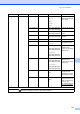
Level 1 Level 2 Level 3 Options Descriptions Page
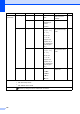
3.Printer 1.Emulation — Auto*
HP LaserJet
BR-Script 3
Chooses the
emulation mode.
See
1
.
2.Print Options 1.Internal Font
1.HP LaserJet
2.BR-Script 3
Prints a list of the
machine’s internal
fonts.
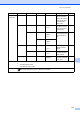
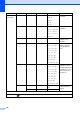
2.Configuration
— Prints a list of the
machine’s printer
settings.
3.Test Print — Prints a test page.
3.Duplex — Off*
On(Long Edge)
On(Short Edge)
Enables or disables
duplex printing. You
can also choose long
edge or short edge
duplex printing.
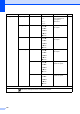
4.Output Color
— Auto*
Color
B&W
Chooses colour or
black & white printed
documents. If you
choose Auto, the
machine selects a
suitable option for the
document (Color or
B&W).
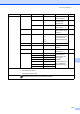
5.Reset Printer
— 1.Reset
2.Exit
Restores the printer
settings to the original
factory default
settings.
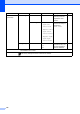
6.Calibration — Calibrate
Reset
Adjusts the colour
density or returns the
colour calibration to
the factory settings.
77
7.Auto Regist.
— 1.Start
2.Exit
Adjust the print
position of each
colour automatically.
78
1
See Software User's Guide.
The factory settings are shown in Bold with an asterisk.