Quick Start Guide
Manuals
Brands
Brother Manuals
All in One Printer
DCP-9055CDN
61
62
63
64
65
66
67
68
69
70
58
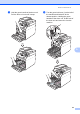
a
Make
sure t
hat the mach
in
e is t
urned
on.
b
Press
the front
cover
release bu
tton
and
then op
en the
front
cover.
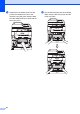
c
Hold the green handle of the
drum unit.
Pull the drum
unit out until it st
ops.
1
...
...
64
65
66
67
68
...
...
151