
All in One Printer User Manual

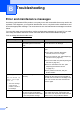
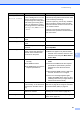
Table Of Contents
- BASIC USER’S GUIDE DCP-9055CDN
- User's Guides and where do I find it?
- Table of Contents
- 1 General information
- 2 Loading paper
- 3 Loading documents
- 4 Making copies
- 5 How to print from a computer
- 6 How to scan to a computer
- A Routine maintenance
- B Troubleshooting
- Error and maintenance messages
- Document is jammed in the top of the ADF unit
- Document is jammed under the document cover
- Removing small documents jammed in the ADF
- Document is jammed at the output tray
- Paper is jammed in the MP tray
- Paper is jammed in the Paper Tray 1 or Tray 2
- Paper is jammed at the back of the machine
- Paper is jammed inside the machine
- Paper is jammed underneath paper tray 1
- Troubleshooting
- Machine Information
- Error and maintenance messages
- C Menu and features
- D Specifications
- Index
- brother ARL/ASA/NZ/SAF/GLF
82
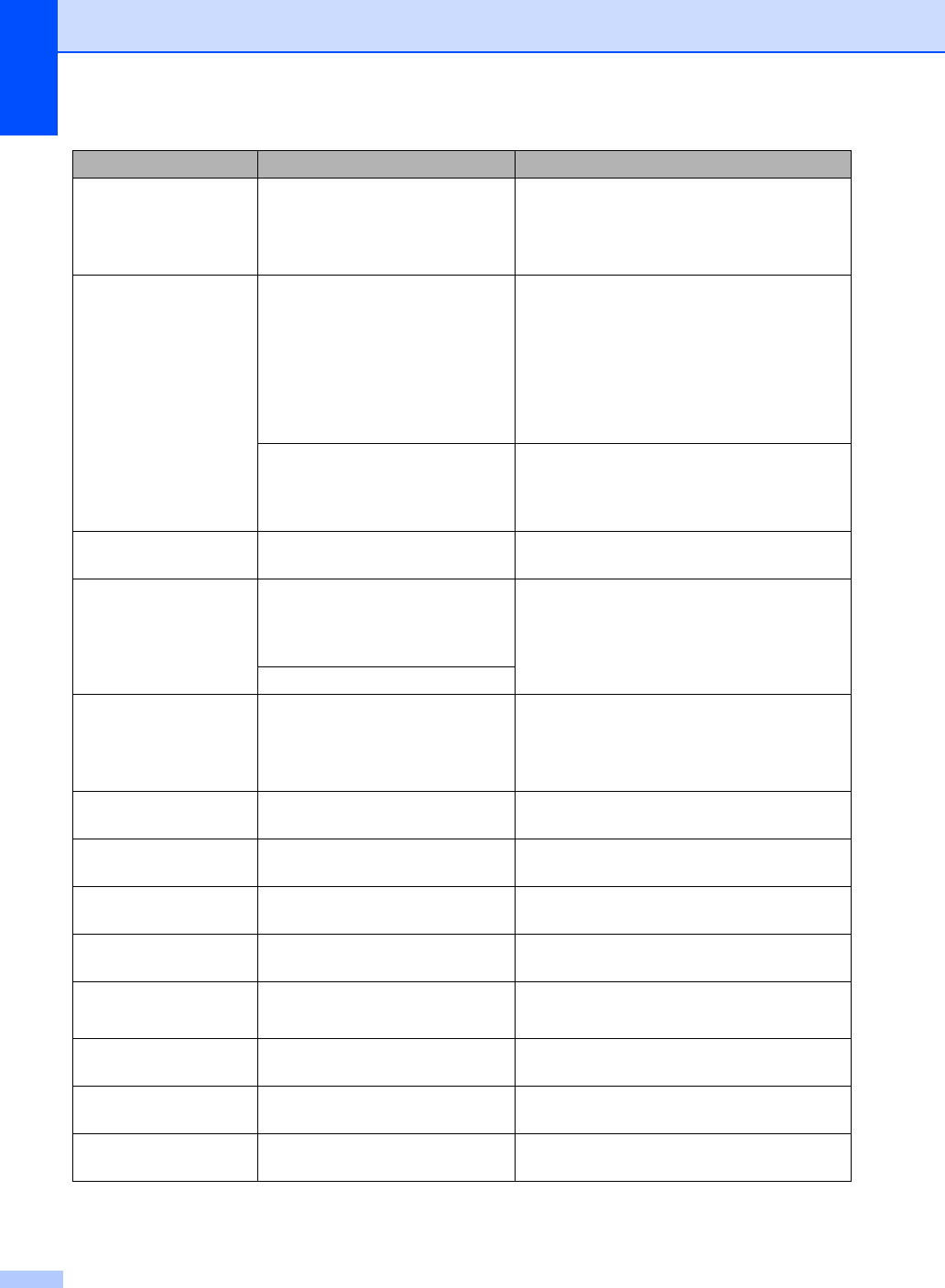
Duplex Disabled
Close the Back
Cover of the
machine.
The back of the machine is not
closed completely.
Close the back cover of the machine.
Duplex Disabled
Reload paper,
then press Start.
Although the size of paper in the
paper tray matches the paper
size that was selected from the
control panel or printer driver, the
machine has stopped printing
when it encountered an
additional, different size of paper
in the tray.
Make sure the paper tray contains only the
size of paper you select in either the control
panel or printer driver, then press
Mono Start or Colour Start.
The paper tray was pulled out
before the machine completed
printing on both sides of the
paper.
Re-install the paper tray and press
Mono Start or Colour Start.
EL Error The machine has a mechanical
problem.
Open the front cover and close it again.
Fuser Error The temperature of the fuser unit
does not rise to a specified
temperature within the specified
time.
Turn the power switch off, wait a few
seconds, and then turn it on again. Leave the
machine for 15 minutes with the power on.
The fuser unit is too hot.
Init Unable XX
(XX = Error Code)
The machine has a mechanical
problem.
Turn the power switch off, and then turn
it on again.
If the problem continues, call your
Brother dealer.
Jam Duplex The paper is jammed underneath
Paper Tray 1.
(See Paper is jammed underneath paper
tray 1 on page 96.)
Jam Inside The paper is jammed inside the
machine.
(See Paper is jammed inside the machine
on page 92.)
Jam MP Tray The paper is jammed in the MP
tray of the machine.
(See Paper is jammed in the MP tray
on page 88.)
Jam Rear The paper is jammed in the back
of the machine.
(See Paper is jammed at the back of the
machine on page 90.)
Jam Tray 1
Jam Tray 2
The paper is jammed in the paper
tray of the machine.
(See Paper is jammed in the Paper Tray 1 or
Tray 2 on page 89.)
Limit Exceeded The printing limit set by Secure
Function Lock 2.0 was reached.
Contact your administrator to check your
Secure Function Lock Settings.
Low Temperature The room temperature is too low
for the machine to operate.
Increase the room temperature to allow the
machine to operate.
No Belt Unit The belt unit is not installed
correctly.
Re-install the belt unit. (See Replacing the
belt unit on page 48.)
Error Message Cause Action