
All in One Printer User Manual

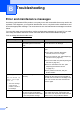
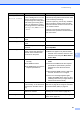
Table Of Contents
- BASIC USER’S GUIDE DCP-9055CDN
- User's Guides and where do I find it?
- Table of Contents
- 1 General information
- 2 Loading paper
- 3 Loading documents
- 4 Making copies
- 5 How to print from a computer
- 6 How to scan to a computer
- A Routine maintenance
- B Troubleshooting
- Error and maintenance messages
- Document is jammed in the top of the ADF unit
- Document is jammed under the document cover
- Removing small documents jammed in the ADF
- Document is jammed at the output tray
- Paper is jammed in the MP tray
- Paper is jammed in the Paper Tray 1 or Tray 2
- Paper is jammed at the back of the machine
- Paper is jammed inside the machine
- Paper is jammed underneath paper tray 1
- Troubleshooting
- Machine Information
- Error and maintenance messages
- C Menu and features
- D Specifications
- Index
- brother ARL/ASA/NZ/SAF/GLF

80
B
Error and maintenance messages B
As with any sophisticated office product, errors may occur and consumable items may need to be
replaced. If this happens, your machine identifies the error or required routine maintenance and
shows the appropriate message. The most common error and maintenance messages are shown
below.
You can clear most errors and perform routine maintenance messages by yourself. If you need
more help, the Brother Solutions Center offers the latest FAQs and troubleshooting tips:
Visit us at http://solutions.brother.com/
.
Troubleshooting B
Error Message Cause Action
Access Denied The function you want to use is
restricted by Secure Function
Lock.
Contact your administrator to check your
Secure Function Lock Settings.
Calibrate Calibration failed. Press Mono Start or Colour Start and try it
again.
Turn off the machine. Wait a few
seconds, then turn it on again.
Put in a new drum unit. (See Replacing
the drum unit on page 42.)
Put in a new belt unit. (See Replacing the
belt unit on page 48.)
Put in a new waste toner box. (See
Replacing the waste toner box
on page 53.)
If the problem continues, call your
Brother dealer.
Cartridge Error
1
Put the Black (K)
Toner Cartridge
back in.
1
The toner cartridge
colour with the
problem is shown in
the message.
The toner cartridge is not installed
correctly.
Pull out the drum unit and remove the toner
cartridge for the colour that is indicated on
the LCD, then re-install toner cartridge in the
drum unit. Put the drum unit back into the
machine again.
Condensation One of the issues that can cause
this error is that condensation
may form inside the machine after
a room temperature change.
Leave switched ON. Fully open the front
cover. Wait 30 minutes, switch OFF and
close cover, then switch ON. If this does not
clear the error, call your Brother dealer.