
All in One Printer User Manual
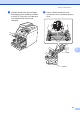
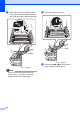
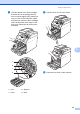
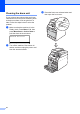

Table Of Contents
- BASIC USER’S GUIDE DCP-9055CDN
- User's Guides and where do I find it?
- Table of Contents
- 1 General information
- 2 Loading paper
- 3 Loading documents
- 4 Making copies
- 5 How to print from a computer
- 6 How to scan to a computer
- A Routine maintenance
- B Troubleshooting
- Error and maintenance messages
- Document is jammed in the top of the ADF unit
- Document is jammed under the document cover
- Removing small documents jammed in the ADF
- Document is jammed at the output tray
- Paper is jammed in the MP tray
- Paper is jammed in the Paper Tray 1 or Tray 2
- Paper is jammed at the back of the machine
- Paper is jammed inside the machine
- Paper is jammed underneath paper tray 1
- Troubleshooting
- Machine Information
- Error and maintenance messages
- C Menu and features
- D Specifications
- Index
- brother ARL/ASA/NZ/SAF/GLF
70
Cleaning the drum unit A
If your printout has coloured dots at 94 mm
intervals the drum may have something stuck
to the drum surface, such as glue from a
label. Follow the steps below to solve the
problem.
a Make sure that the machine is in the
Ready mode. Press Menu, 5, 6, then
press Mono Start or Colour Start to
print the drum dot check sheet.
56.Drum Dot Print
Printing
b Turn off the machine. Disconnect all
cables, and then unplug the power cord
from the electrical socket.
c Press the front cover release button and
then open the front cover.