
All in One Printer User Manual
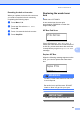
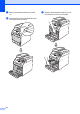
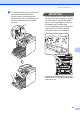
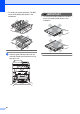
Table Of Contents
- BASIC USER’S GUIDE DCP-9055CDN
- User's Guides and where do I find it?
- Table of Contents
- 1 General information
- 2 Loading paper
- 3 Loading documents
- 4 Making copies
- 5 How to print from a computer
- 6 How to scan to a computer
- A Routine maintenance
- B Troubleshooting
- Error and maintenance messages
- Document is jammed in the top of the ADF unit
- Document is jammed under the document cover
- Removing small documents jammed in the ADF
- Document is jammed at the output tray
- Paper is jammed in the MP tray
- Paper is jammed in the Paper Tray 1 or Tray 2
- Paper is jammed at the back of the machine
- Paper is jammed inside the machine
- Paper is jammed underneath paper tray 1
- Troubleshooting
- Machine Information
- Error and maintenance messages
- C Menu and features
- D Specifications
- Index
- brother ARL/ASA/NZ/SAF/GLF
Routine maintenance
53
A
Resetting the belt unit counter A
When you replace a belt unit with a new one,
you need to reset the belt unit counter by
completing the following steps:
a Press Menu, 5, 8.
b Press a or b to select Belt Unit.
Press OK.
c Press 1 to reset the belt unit counter.
d Press Stop/Exit.
Replacing the waste toner
box A
Model name: WT-300CL
A new waste toner box can print
approximately 50,000 A4 or Letter size
single-sided pages.
WT Box End Soon A
WT Box End Soon
If the LCD shows WT Box End Soon, it
means the waste toner box is near the end of
its life. Buy a new waste toner box and have
it ready before you get a Replace WT Box
message.
Replace WT Box A
When the following message appears on the
LCD, you need to replace the waste toner
box:
Replace WT Box
Replace...
WARNING
DO NOT put the waste toner box into a fire.
It could explode.
Be careful not to spill the toner. DO NOT
inhale or allow it to get into your eyes.
IMPORTANT
DO NOT reuse the waste toner box.