
All in One Printer User Manual
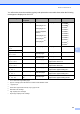
Table Of Contents
- BASIC USER’S GUIDE DCP-9055CDN
- User's Guides and where do I find it?
- Table of Contents
- 1 General information
- 2 Loading paper
- 3 Loading documents
- 4 Making copies
- 5 How to print from a computer
- 6 How to scan to a computer
- A Routine maintenance
- B Troubleshooting
- Error and maintenance messages
- Document is jammed in the top of the ADF unit
- Document is jammed under the document cover
- Removing small documents jammed in the ADF
- Document is jammed at the output tray
- Paper is jammed in the MP tray
- Paper is jammed in the Paper Tray 1 or Tray 2
- Paper is jammed at the back of the machine
- Paper is jammed inside the machine
- Paper is jammed underneath paper tray 1
- Troubleshooting
- Machine Information
- Error and maintenance messages
- C Menu and features
- D Specifications
- Index
- brother ARL/ASA/NZ/SAF/GLF

Routine maintenance
33
A
You will need to clean the machine regularly and replace the consumable items when the following
messages are displayed on the LCD.
1
A4 or Letter size single-sided pages.
2
Approx. cartridge yield is declared in accordance with ISO/IEC 19798.
3
1 page per job.
4
Drum life is approximate and may vary by type of use.
5
Standard toner cartridge
6
High capacity toner cartridge
7
Super High capacity toner cartridge
LCD messages Consumable item
to replace
Approximate life How to replace Model name
Replace Toner Toner cartridge <Black>
2,500 pages
125
6,000 pages
127
<Cyan, Magenta,
Yellow>
1,500 pages
125
3,500 pages
126
6,000 pages
127
See page 35.
TN-340BK
5
,
TN-348BK
7
,
TN-340C
5
,
TN-345C
6
,
TN-348C
7
,
TN-340M
5
,
TN-345M
6
,
TN-348M
7
,
TN-340Y
5
,
TN-345Y
6
,
TN-348Y
7
Replace Parts
Drum
Drum unit
25,000 pages
134
See page 42. DR-340CL
Drum Stop
Replace Parts
Belt Unit
Belt unit
50,000 pages
1
See page 48. BU-300CL
Replace WT Box Waste toner box
50,000 pages
1
See page 53. WT-300CL
Replace Parts
Fuser Unit
Fuser unit
100,000 pages
1
Call your Brother dealer for a
replacement fuser unit.
Replace Parts
Laser Unit
Laser unit
100,000 pages
1
Call your Brother dealer for a
replacement laser unit.
Replace Parts
PF Kit 1
Paper feeding kit 1
100,000 pages
1
Call your Brother dealer for a
replacement paper feeding kit 1.
Replace Parts
PF Kit 2
Paper feeding kit 2
100,000 pages
1
Call your Brother dealer for a
replacement paper feeding kit 2.
Replace Parts
PF Kit MP
Paper feeding kit
MP
50,000 pages
1
Call your Brother dealer for a
replacement paper feeding kit MP.