
All in One Printer User Manual


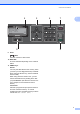
Table Of Contents
- BASIC USER’S GUIDE DCP-9055CDN
- User's Guides and where do I find it?
- Table of Contents
- 1 General information
- 2 Loading paper
- 3 Loading documents
- 4 Making copies
- 5 How to print from a computer
- 6 How to scan to a computer
- A Routine maintenance
- B Troubleshooting
- Error and maintenance messages
- Document is jammed in the top of the ADF unit
- Document is jammed under the document cover
- Removing small documents jammed in the ADF
- Document is jammed at the output tray
- Paper is jammed in the MP tray
- Paper is jammed in the Paper Tray 1 or Tray 2
- Paper is jammed at the back of the machine
- Paper is jammed inside the machine
- Paper is jammed underneath paper tray 1
- Troubleshooting
- Machine Information
- Error and maintenance messages
- C Menu and features
- D Specifications
- Index
- brother ARL/ASA/NZ/SAF/GLF
Chapter 1
6
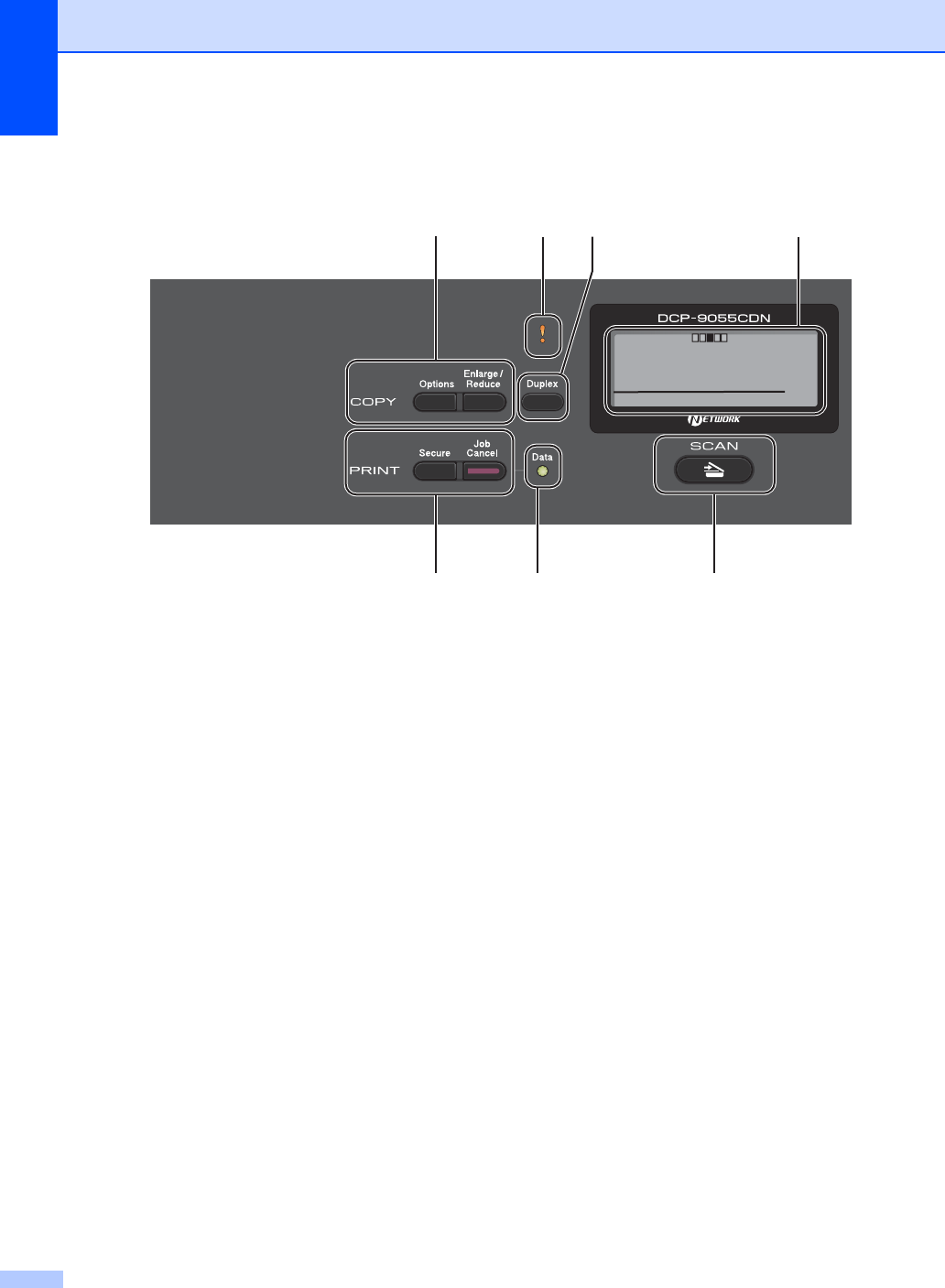
Control panel overview 1
1 Copy keys:
Options
You can quickly and easily choose temporary
settings for copying.
Enlarge/Reduce
Reduces or enlarges copies.
2 Error LED
Blinks in orange when the LCD displays an
error or an important status message.
3 Duplex
You can choose Duplex to copy on both sides
of the paper.
4LCD
Displays messages to help you set up and use
your machine.
5Clear
Deletes entered data or lets you cancel the
current setting.
Menu
Lets you access the Menu to program your
settings in this machine.
OK
Lets you store your settings in the machine.
Selection keys:
d or c
Press to scroll backwards or forwards through
menu selections.
a or b
Press to scroll through the menus and options.
6 Numeric keys
Use these keys to enter text.
7Stop/Exit
Stops an operation or exits from a menu.
8Start:
Colour
Lets you start making copies in full colour.
Mono
Lets you start making copies in black & white.
4
9
123
1011
Contrast:- +
Quality :Auto
Enlg/Red:100%
Tray :MP>T1
Sleep
01