
All in One Printer User Manual

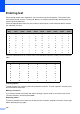
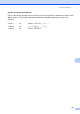
Table Of Contents
- BASIC USER’S GUIDE DCP-9055CDN
- User's Guides and where do I find it?
- Table of Contents
- 1 General information
- 2 Loading paper
- 3 Loading documents
- 4 Making copies
- 5 How to print from a computer
- 6 How to scan to a computer
- A Routine maintenance
- B Troubleshooting
- Error and maintenance messages
- Document is jammed in the top of the ADF unit
- Document is jammed under the document cover
- Removing small documents jammed in the ADF
- Document is jammed at the output tray
- Paper is jammed in the MP tray
- Paper is jammed in the Paper Tray 1 or Tray 2
- Paper is jammed at the back of the machine
- Paper is jammed inside the machine
- Paper is jammed underneath paper tray 1
- Troubleshooting
- Machine Information
- Error and maintenance messages
- C Menu and features
- D Specifications
- Index
- brother ARL/ASA/NZ/SAF/GLF
120
Entering text C
When setting certain menu selections, you will need to type text characters. The numeric keys
have letters printed on them. The keys: 0, # and l do not have printed letters because they are
used for special characters.
Press the appropriate numeric key the number of times shown in this reference table to access
the character you want.
For menu selections that do not allow lower case character selection, please use this reference
table.
Inserting spaces
To enter a space in a number, press c once between numbers. To enter a space in a name, press
c twice between characters.
Making corrections
If you entered a letter incorrectly and want to change it, press d or c to move the cursor to the
incorrect character, and then press Clear.
Repeating letters
To enter a character on the same key as the previous character, press c to move the cursor right
before pressing the key again.
Press
Key
one
time
two
times
three
times
four
times
five
times
six
times
seven
times
eight
times
nine
times
1 @./1@. /1@
2 abcABC2ab
3 de fDEF3de
4 gh iGHI 4gh
5 jklJKL5jk
6 mn oMNO6mn
7 pqr sPQRS7
8 tuvTUV8tu
9 wx y zWXYZ9
Press Key one time two times three times four times five times
2 ABC2A
3 DEF3D
4 GH I 4G
5 JKL5J
6 MNO6M
7 PQRS7
8 TUV8T
9 WXYZ 9