
All in One Printer User Manual
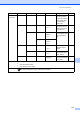

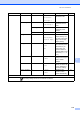
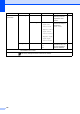
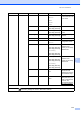
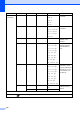
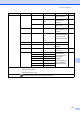
Table Of Contents
- BASIC USER’S GUIDE DCP-9055CDN
- User's Guides and where do I find it?
- Table of Contents
- 1 General information
- 2 Loading paper
- 3 Loading documents
- 4 Making copies
- 5 How to print from a computer
- 6 How to scan to a computer
- A Routine maintenance
- B Troubleshooting
- Error and maintenance messages
- Document is jammed in the top of the ADF unit
- Document is jammed under the document cover
- Removing small documents jammed in the ADF
- Document is jammed at the output tray
- Paper is jammed in the MP tray
- Paper is jammed in the Paper Tray 1 or Tray 2
- Paper is jammed at the back of the machine
- Paper is jammed inside the machine
- Paper is jammed underneath paper tray 1
- Troubleshooting
- Machine Information
- Error and maintenance messages
- C Menu and features
- D Specifications
- Index
- brother ARL/ASA/NZ/SAF/GLF
Menu and features
117
C
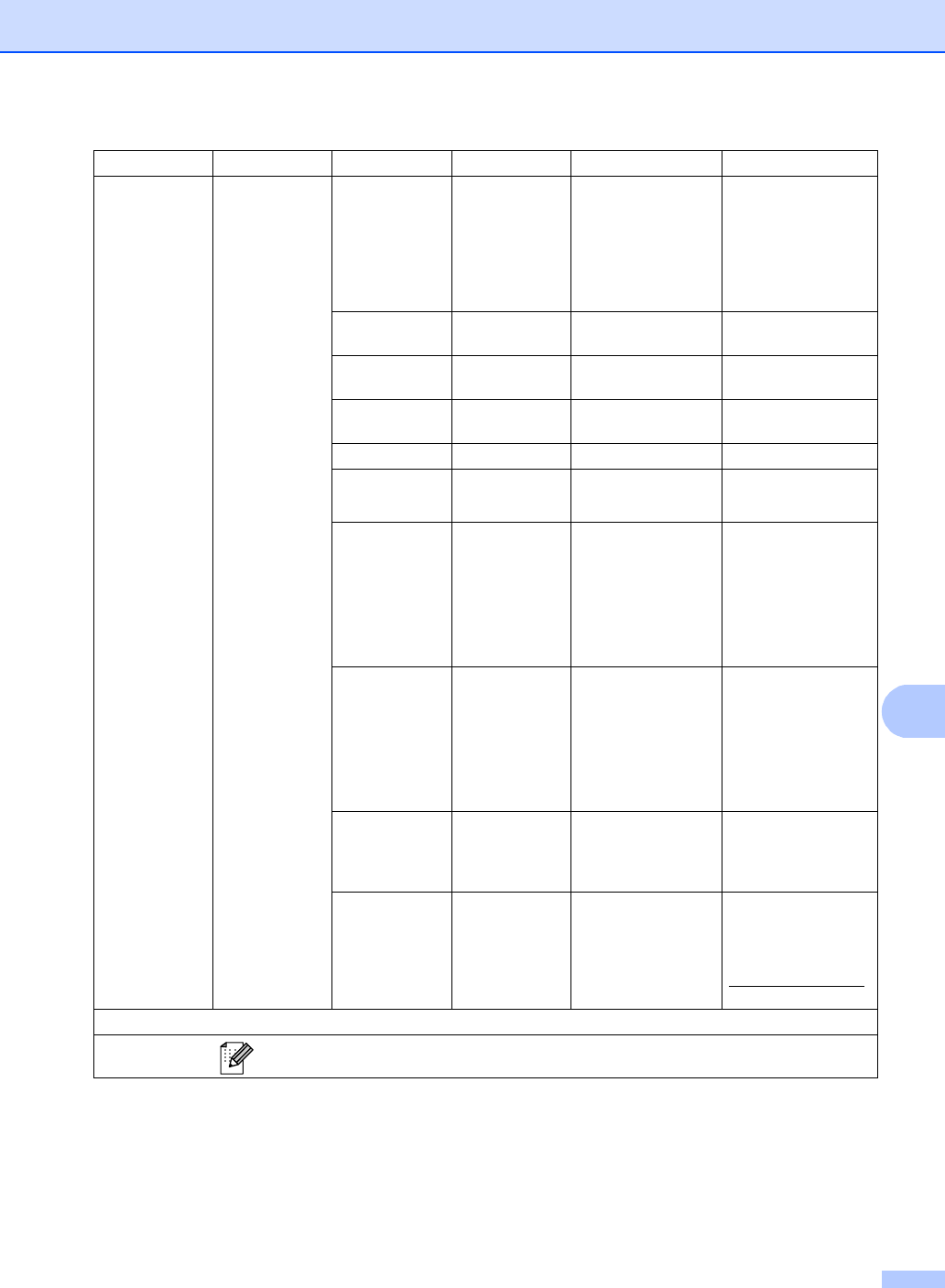
Level 1 Level 2 Level 3 Level 4 Options Descriptions
4.Network 1.TCP/IP
1.Boot Method
— Auto*
Static
RARP
BOOTP
DHCP
Chooses the BOOT
method that best suits
your needs.
2.IP Address
— [000-255]. [000-255].
[000-255]. [000-255]
Enter the IP address.
3.Subnet Mask
— [000-255]. [000-255].
[000-255]. [000-255]
Enter the Subnet
mask.
4.Gateway — [000-255]. [000-255].
[000-255]. [000-255]
Enter the Gateway
address.
5.Node Name — BRNXXXXXXXXXXXX Enter the Node name.
6.WINS Config
— Auto*
Static
Chooses the WINS
configuration mode.
7.WINS Server
— Primary
[000-255]. [000-255].
[000-255]. [000-255]
Secondary
[000-255]. [000-255].
[000-255]. [000-255]
Specifies the IP
address of the
primary or secondary
WINS server.
8.DNS Server
— Primary
[000-255]. [000-255].
[000-255]. [000-255]
Secondary
[000-255]. [000-255].
[000-255]. [000-255]
Specifies the IP
address of the
primary or secondary
DNS server.
9.APIPA — On*
Off
Automatically
allocates the IP
address from the link-
local address range.
0.IPv6 — On
Off*
Enable or Disable the
IPv6 protocol. If you
want to use the IPv6
protocol, visit
http://solutions.brother.com/
for more information.
See Network User's Guide.
The factory settings are shown in Bold with an asterisk.