
All in One Printer User Manual


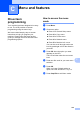
Table Of Contents
- BASIC USER’S GUIDE DCP-9055CDN
- User's Guides and where do I find it?
- Table of Contents
- 1 General information
- 2 Loading paper
- 3 Loading documents
- 4 Making copies
- 5 How to print from a computer
- 6 How to scan to a computer
- A Routine maintenance
- B Troubleshooting
- Error and maintenance messages
- Document is jammed in the top of the ADF unit
- Document is jammed under the document cover
- Removing small documents jammed in the ADF
- Document is jammed at the output tray
- Paper is jammed in the MP tray
- Paper is jammed in the Paper Tray 1 or Tray 2
- Paper is jammed at the back of the machine
- Paper is jammed inside the machine
- Paper is jammed underneath paper tray 1
- Troubleshooting
- Machine Information
- Error and maintenance messages
- C Menu and features
- D Specifications
- Index
- brother ARL/ASA/NZ/SAF/GLF

109
C
C
On-screen
programming
C
Your machine has been designed to be easy
to use. The LCD provides on-screen
programming using the menu keys.
We have created step by step on-screen
instructions to help you program your
machine. Simply follow the steps as they
guide you through the menu selections and
programming options.
How to access the menu
mode C
a Press Menu.
b Choose an option.
Press 1 for General Setup menu.
Press 2 for Copy menu.
Press 3 for Printer menu.
Press 4 for Network menu.
Press 5 for Machine Info. menu.
You can also scroll through each menu
level by pressing a or b for the direction
you want.
c Press OK when the option you want
appears on the LCD.
The LCD will then show the next menu
level.
d Press a or b to scroll to your next menu
selection.
e Press OK.
When you have finished setting an
option, the LCD will show Accepted.
f Press Stop/Exit to exit Menu mode.
Menu and features C