
User`s guide


Changing your machine’s network settings
5
2
• You can find the Node Name and MAC Address (Ethernet Address) by printing the Network Configuration
List. (See Printing the Network Configuration List on page 12 for information on how to print the Network
Configuration List on your print server.) You can also find the Node Name and MAC Address from the
control panel. (See Chapter 3: Control panel setup.)
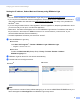
d Choose STATIC from Boot Method (BOOT Method). Enter the IP Address, Subnet Mask and
Gateway (if needed) of your print server.
e Click OK.
f With the correctly programmed IP address, you will see the Brother print server in the device list.
Windows
®
Macintosh