
User`s guide


Troubleshooting
53
6
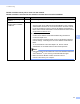
Did your previous printing
job fail?
wired If the failed printing job is still in the print queue of your computer, delete
it.
Double-click the printer icon in the following folder and then choose the
Cancel All Documents in the Printer menu:
(Windows
®
2000)
Start, Settings and then Printers.
(Windows
®
XP)
Start and Printers and Faxes.
(Windows Vista
®
)
, Control Panel, Hardware and Sound and then Printers.
(Windows
®
7)
Click the button and then Devices and Printers.
I have checked and tried all
of above, however the
Brother machine does not
print/scan. Is there anything
else I can do?
wired Uninstall the MFL-Pro Suite and reinstall it.
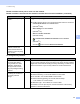
I'm using security software.
Question Interface Solution
Did you choose to accept
the security alert dialog
during the MFL-Pro Suite
installation, applications'
start-up process or when
using the printing/scanning
features?
wired If you did not choose to accept the security alert dialog, the firewall function
of your security software may be rejecting access. Some security software
might block access without showing a security alert dialog. To allow access,
see the instructions of your security software or ask the manufacturer.
I want to know the
necessary port number for
the security software
settings.
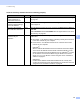
wired The following port numbers are used for Brother network features:
Network scanning i Port number 54925 / Protocol UDP
PC-FAX RX i Port number 54926 / Protocol UDP
Network scanning/printing, PC-FAX RX, Remote Setup
i Port number 137 / Protocol UDP
BRAdmin Light i Port number 161 / Protocol UDP
For details on how to open the port, see the instructions of the security
software or ask the manufacturer.
Brother machine cannot print or scan over the network.
Brother machine is not found on the network even after the successful installation. (continued)
Question Interface Solution