
User`s guide


Security features
49
5
Managing multiple certificates 5
This multiple certificate feature allows you to manage each certificate that you have installed using Web
Based Management. After installing certificates, you can view what certificates are installed from the
Configure Certificate page and then view each certificate's content, delete or export the certificate. For
information on how to access the Configure Certificate page, see Configure certificate using Web Based
Management on page 40. The Brother machine allows you to store up to four self-signed certificates or up to
four certificates issued by a CA. You can use the stored certificates for using the HTTPS/IPPS protocol,
IEEE 802.1x authentication or a Signed PDF.
You can also store up to four CA certificates for using IEEE 802.1x authentication and SSL for SMTP/POP3.
We recommend you store one certificate less and keep the last free to deal with certificate expiration. For
example, if you want to store a CA certificate, store three certificates and leave one storage as a backup. In
the case of re-issuing the certificate, such as when the certificate is expired, you can import a new certificate
to the backup and then you can delete the expired certificate, to avoid configuration failure.
Note
When you use HTTPS/IPPS, IEEE 802.1x or Signed PDF, you must choose which certificate you are
using.
Import and export a CA certificate 5
You can store a CA certificate on the machine by importing and exporting.
How to import a CA certificate 5
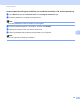
a Click Configure CA Certificate on the Configure Certificate page.
b Click Import CA Certificate. Click Submit.
How to export a CA certificate 5
a Click Configure CA Certificate on the Configure Certificate page.
b Choose the certificate you want to export and click Export. Click Submit.