
User`s guide


Security features
32
5
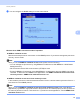
i You can configure the SNMP settings from the screen below.
We have three SNMP connection modes of operation. 5
SNMPv3 read-write access
With this mode the print server uses version 3 of the SNMP protocol. If you want to manage the print server
securely, use this mode.
Note
When you use the SNMPv3 read-write access mode, please note the following.
• You can manage the print server by using BRAdmin Professional 3, Web BRAdmin or Web Based
Management only.
• We recommend secure SSL communication (HTTPS) be used.
• Except for BRAdmin Professional 3 and Web BRAdmin, all applications that use SNMPv1/v2c will be
restricted. To allow the use of SNMPv1/v2c applications, use SNMPv3 read-write access and v1/v2c
read-only access or SNMPv1/v2c read-write access mode.
SNMPv3 read-write access and v1/v2c read-only access
In this mode the print server uses the read-write access of version 3 and the read-only access of version 1
and version 2c of the SNMP protocol.
Note
When you use the SNMPv3 read-write access and v1/v2c read-only access mode, some Brother
applications (e.g. BRAdmin Light) that access to the print server do not work properly since they authorize
the read-only access of version 1 and version 2c. If you want to use all applications, use the SNMPv1/v2c
read-write access mode.