
Quick Start Manual






6
1
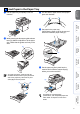
Push the lever (1) in the direction shown to
unlock the scanner.
(The gray scanner lock lever is located at
the back left side, under the document cover
(2).)
w
Do not connect the Parallel or USB
cable yet.
1
Make sure that the power switch is off.
Connect the AC power cord to the machine.
2
Plug the AC power cord into an AC outlet.
Turn the power switch on.
3
Release the Scanner
Lock
(2)
(1)
4 Install the Power Cord
If Scanner locked appears on the LCD,
immediately release the scanner lock and
press Stop/Exit. (See “Release the Scanner
Lock” on page 6.)
Step 1
Setting Up the machine