
All in One Printer User Manual



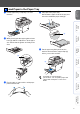
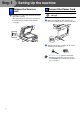
Table Of Contents
- Quick Setup Guide DCP-8060/DCP-8065DN
- Getting Started
- Table of Contents
- Step1 Setting Up the machine
- Step2 Installing the Drivers & Software
- Supplied CD-ROM “MFL-Pro Suite”
- For USB Interface Cable Users (For Windows® 98/98SE/Me/2000 Professional/XP/XP Professional x64 Edition)
- For Parallel Interface Cable Users (For Windows® 98/98SE/Me/2000 Professional/XP/XP Professional x64 Edition)
- For Windows NT® Workstation Version 4.0 Users
- For Network Interface Cable Users (DCP-8065DN only) (For Windows® 98/98SE/Me/NT/2000 Professional/XP/XP Professional x64 Edition)
- For USB Interface Cable Users
- For Network Interface Cable Users (DCP-8065DN only)
- For Network Users and Administrators (DCP-8065DN only)
- Options and Consumables
- brother ARL/ASA/NZ

5
Setting Up
the machine
Windows
®
USB
Windows
®
Parallel
Windows
NT
®
4.0
Parallel
Macintosh
®
USB
Macintosh
®
Network
Windows
®
Network
Network
Administrators
1
Pull the paper tray completely out of the
machine.
2
While pressing the blue paper guide release
lever (1), slide the adjusters to fit the paper
size. Check that the guides are firmly in the
slots.
3
Fan the stack of paper well to avoid paper
jams and misfeeds.
4
Put paper in the paper tray.
Check that the paper is flat in the tray and
below the maximum paper mark (1).
5
Put the paper tray firmly back into the
machine and unfold the support flap (1)
before you use the machine.
2 Load Paper in the Paper Tray
(1)
For details on supported paper
specifications, see “Acceptable paper and
other media” in Chapter 2 of the User’s
Guide.
(1)
(1)