
All in One Printer User Manual


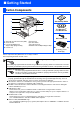

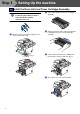
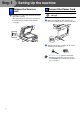
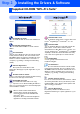
Table Of Contents
- Quick Setup Guide DCP-8060/DCP-8065DN
- Getting Started
- Table of Contents
- Step1 Setting Up the machine
- Step2 Installing the Drivers & Software
- Supplied CD-ROM “MFL-Pro Suite”
- For USB Interface Cable Users (For Windows® 98/98SE/Me/2000 Professional/XP/XP Professional x64 Edition)
- For Parallel Interface Cable Users (For Windows® 98/98SE/Me/2000 Professional/XP/XP Professional x64 Edition)
- For Windows NT® Workstation Version 4.0 Users
- For Network Interface Cable Users (DCP-8065DN only) (For Windows® 98/98SE/Me/NT/2000 Professional/XP/XP Professional x64 Edition)
- For USB Interface Cable Users
- For Network Interface Cable Users (DCP-8065DN only)
- For Network Users and Administrators (DCP-8065DN only)
- Options and Consumables
- brother ARL/ASA/NZ

4
Setting Up the machine
Do not connect the interface cable.
Connecting the interface cable is
done during the software
installation process.
1
Open the front cover by pressing the front
cover release button (1).
2
Unpack the drum unit and toner cartridge
assembly.
3
Gently rock it from side to side several times
to distribute the toner evenly inside the
cartridge.
4
Put the drum unit and toner cartridge into
the machine so that it clicks into place.
5
Close the front cover of the machine.
1 Install the Drum Unit and Toner Cartridge Assembly
(1)
Step 1