
All in One Printer User Manual

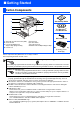

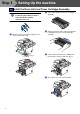
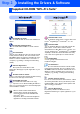
Table Of Contents
- Quick Setup Guide DCP-8060/DCP-8065DN
- Getting Started
- Table of Contents
- Step1 Setting Up the machine
- Step2 Installing the Drivers & Software
- Supplied CD-ROM “MFL-Pro Suite”
- For USB Interface Cable Users (For Windows® 98/98SE/Me/2000 Professional/XP/XP Professional x64 Edition)
- For Parallel Interface Cable Users (For Windows® 98/98SE/Me/2000 Professional/XP/XP Professional x64 Edition)
- For Windows NT® Workstation Version 4.0 Users
- For Network Interface Cable Users (DCP-8065DN only) (For Windows® 98/98SE/Me/NT/2000 Professional/XP/XP Professional x64 Edition)
- For USB Interface Cable Users
- For Network Interface Cable Users (DCP-8065DN only)
- For Network Users and Administrators (DCP-8065DN only)
- Options and Consumables
- brother ARL/ASA/NZ

1
Carton components may differ from one country to another.
Save all packing materials and the carton.
Carton Components
Quick Setup Guide
CD-ROMs
For Windows
®
For Macintosh
®
AC Power Cord
Drum Unit Assembly
(including Toner
Cartridge)
Austraria & New Zealand users: Hong Kong, Malaysia & Singapore users:
The mains plug supplied with this machine is a grounded three pin plug. Make sure that the AC socket will
accept this grounded three pin plug. This machine must be grounded, If in doubt, call a qualified electrician.
Philipine & Thailand users:
The mains plug supplied with this machine is a side grounded two pin plug. Make sure that
the AC socket will accept this side grounded two pin plug. This machine must be grounded,
If in doubt, call a qualified electrician.
■ To ensure safe operation the supplied plug must be inserted only into a standard power outlet that is
properly grounded through the standard electrical wiring. None grounded equipment may cause an
electrical shock hazard, and may cause excessive electrical noise radiation.
■ The interface cable is not a standard accessory. Please purchase the appropriate interface cable for
the interface you intend to use (Parallel, USB or Network).
■ Do NOT connect the interface cable at this time. Connecting the interface cable is done during the
software installation process.
■ USB interface cable
Please make sure you use a USB 2.0 interface cable that is no longer than 2.0 meters.
When you use a USB cable, make sure you connect it to the USB port of your computer and not to a
USB port on a keyboard or non-powered USB hub.
■ Parallel interface cable
Please make sure you use a Parallel interface cable that is no longer than 2.0 meters.
Use a shielded interface cable that is IEEE 1284-compliant.
■ Network cable (DCP-8065DN only)
Use a straight-through Category5 (or greater) twisted-pair cable for 10BASE-T or 100Base-TX Fast
Ethernet Network.
1
. Automatic Document Feeder (ADF)
2
. Control Panel
3
. Face-down Output Tray
Support Flap (Support Flap)
4
. Front Cover
5
. Paper Tray
6
. Power Switch
7
. Document Cover
8
. ADF Document Output Support Flap
1
6
2
3
4
5
8
7
■ Getting Started