
All in One Printer User Manual
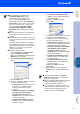
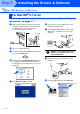
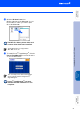
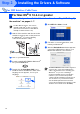
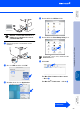
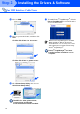
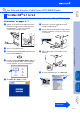
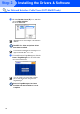
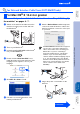
Table Of Contents
- Quick Setup Guide DCP-8060/DCP-8065DN
- Getting Started
- Table of Contents
- Step1 Setting Up the machine
- Step2 Installing the Drivers & Software
- Supplied CD-ROM “MFL-Pro Suite”
- For USB Interface Cable Users (For Windows® 98/98SE/Me/2000 Professional/XP/XP Professional x64 Edition)
- For Parallel Interface Cable Users (For Windows® 98/98SE/Me/2000 Professional/XP/XP Professional x64 Edition)
- For Windows NT® Workstation Version 4.0 Users
- For Network Interface Cable Users (DCP-8065DN only) (For Windows® 98/98SE/Me/NT/2000 Professional/XP/XP Professional x64 Edition)
- For USB Interface Cable Users
- For Network Interface Cable Users (DCP-8065DN only)
- For Network Users and Administrators (DCP-8065DN only)
- Options and Consumables
- brother ARL/ASA/NZ

25
Make sure that you have finished the instructions from Step 1 “Setting Up
the machine” on pages 4 - 7.
1
Switch off the machine and disconnect the
machine from the power socket (and from
the Macintosh
®
, if you have already
connected an interface cable).
2
Turn on your Macintosh
®
.
3
Insert the supplied CD-ROM for Macintosh
®
into your CD-ROM drive.
4
Double-click the Start Here OS 9.1-9.2 icon
to install the printer driver. If the language
screen appears, choose your language.
5
Click MFL-Pro Suite to install.
6
Follow the on-screen instructions, and
restart your Macintosh
®
.
7
Connect the network interface cable to the
machine, and then connect it to a free port
on your hub.
8
Plug in the power cord and turn on the
machine.
9
From the Apple
®
menu, click Chooser.
For Network Interface Cable Users (DCP-8065DN only)
For Mac OS
®
9.1 to 9.2
Continued...
Installing the Drivers & Software
Macintosh
®
Network
Macintosh
®
USB
Setting Up
the machine
Network
Administrators