
User Manual

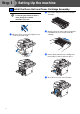
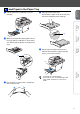
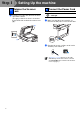
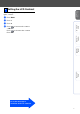
Table Of Contents
- Quick Setup Guide DCP-8060
- Table of Contents
- Getting Started
- Step1 Setting Up the machine
- Step2 Installing the Drivers & Software
- Options and Consumables
- Brother ENG

7
Setting Up
the machine
Windows
®
USB
Windows
®
Parallel
Windows
NT
®
4.0
Parallel
Macintosh
®
USB
You can change the contrast to help the LCD look
lighter or darker.
1 Press Menu.
2 Press 1.
3 Press 6.
4 Press to increase the contrast.
—OR—
Press to decrease the contrast.
Press OK.
5 Setting the LCD Contrast
Go to the next page to
install the drivers & software